
4操作
1 获取设置内容的方法
- text() - 设置或返回所选元素的文本内容
- html() - 设置或返回所选元素的内容(包括 HTML 标记)
- val() - 设置或返回表单字段的值
1 | $("#btn1").click(function(){ |
2 获取设置属性的方法
attr() 方法用于获取属性值。
1 | $("button").click(function(){ |
jQuery 方法 attr(),也提供回调函数。回调函数有两个参数:被选元素列表中当前元素的下标,以及原始(旧的)值。然后以函数新值返回您希望使用的字符串。
1 | $("button").click(function(){ |
3 添加元素
- append() - 在被选元素的结尾插入内容
- prepend() - 在被选元素的开头插入内容
- after() - 在被选元素之后插入内容
- before() - 在被选元素之前插入内容
1 | $("p").append("追加文本"); |
4 删除元素
- remove() - 删除被选元素(及其子元素)
- empty() - 从被选元素中删除子元素
1 | $("#div1").remove(); |
5 CSS设置
- addClass() - 向被选元素添加一个或多个类
- removeClass() - 从被选元素删除一个或多个类
- toggleClass() - 对被选元素进行添加/删除类的切换操作
- css() - 设置或返回样式属性
1 | $("button").click(function(){ |
7 尺寸设置
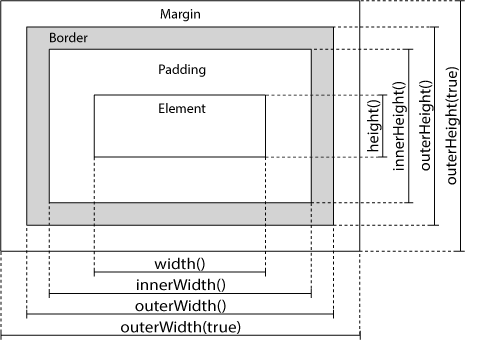
- width()
- height()
- innerWidth()
- innerHeight()
- outerWidth()
- outerHeight()
本博客所有文章除特别声明外,均采用 CC BY-NC-SA 4.0 许可协议。转载请注明来源 Estom的博客!
相关推荐

2022-04-18
06 位置
CSS 的 position 定位属性允许自定义元素在 HTML 页面的位置,但需要先开启元素在 HTML 页面中的定位。 值得注意的是: 元素在 HTML 页面中默认是不开启定位的。 CSS 定位属性提供了四种方式的定位效果: static: 默认值,表示元素为静态定位。 absolute: 表示元素为绝对定位。 fixed: 表示元素为固定定位。 relative: 表示元素为相对定位。 当设置元素的 position 定位属性为非默认值时,CSS 提供了上、右、下和左四个方向的偏移量完成元素的位置设置。 top: 表示当前元素到上边的距离。 right: 表示当前元素到右边的距离。 bottom: 表示当前元素到下边的距离。 left: 表示当前元素到左边的距离。 绝对定位 属性值 描述 absolute 生成绝对定位的元素,相对于 static 定位以外的第一个父元素进行定位。 元素的位置通过 “left”, “top”, “right” 以及 “bottom” 属性进行规定。 元素开启绝对定位后,与浮动效果类似: 元素会脱离文档流。 元...

2019-11-30
11 容器
Scala Collection1 容器概述Scala提供了一套很好的集合实现,提供了一些集合类型的抽象。 Scala 集合分为可变的和不可变的集合。 可变集合可以在适当的地方被更新或扩展。这意味着你可以修改,添加,移除一个集合的元素。 而不可变集合类,相比之下,永远不会改变。不过,你仍然可以模拟添加,移除或更新操作。但是这些操作将在每一种情况下都返回一个新的集合,同时使原来的集合不发生改变。 接下来我们将为大家介绍几种常用集合类型的应用: 序号 集合及描述1 Scala List(列表)List的特征是其元素以线性方式存储,集合中可以存放重复对象。 参考 API文档 2 Scala Set(集合)Set是最简单的一种集合。集合中的对象不按特定的方式排序,并且没有重复对象。 参考 API文档 3 Scala Map(映射)Map 是一种把键对象和值对象映射的集合,它的每一个元素都包含一对键对象和值对象。 参考 API文档 4 Scala 元组元组是不同类型的值的集合 5 Scala OptionOption[T] 表示有可能包含值的容器,也可能不包含值。 6 Scala Iter...

2022-04-18
03 盒子模型
什么是盒子模型盒子模型,也可以称为框模型。 所有 HTML 元素可以看作盒子。在 CSS 中,”box model” 这一术语是用来设计和布局时使用。 CSS 盒模型本质上是一个盒子,封装周围的 HTML 元素,它包括:边距,边框,填充,和实际内容。 不同部分的说明: Margin(外边距): 清除边框区域。Margin没有背景颜色,它是完全透明。 Border(边框): 边框周围的填充和内容。边框是受到盒子的背景颜色影响。 Padding(内边距): 清除内容周围的区域。会受到框中填充的背景颜色影响。 Content(内容): 盒子的内容,显示文本和图像。 为了在所有浏览器中的元素的宽度和高度设置正确的话,你需要知道的盒模型是如何工作的。 元素的宽度和高度下面的例子中的元素的总宽度为 300px: 1234width:250px;padding:10px;border:5px solid gray;margin:10px; 完整的 HTML 代码如下: 1234567891011121314151617181920212223<!DOCTYPE html>&...

2022-12-04
08.经纬度数据操作
1. geoadd 添加地理位置信息 2. geopos 查询位置的坐标 3. geodist 查询位置距离 4. georadius 查询某点的附近点 5. georadiusbymember 查询某位置距离的附近点 6. geohash 查询位置GEOHASH编码 1. geoadd 添加地理位置信息命令:geoadd key longitude latitude member [longitude latitude member ...] longitude表示经度,latitude表示纬度,member表示成员 命令描述:将指定的地理空间位置(纬度、经度、名称)添加到指定的key中。 返回值:添加到sorted set元素的数目,但不包括已更新score的元素。 123# 示例127.0.0.1:6379> geoadd Guangdong-cities 113.2278442 23.1255978 Guangzhou 113.106308 23.0088312 Foshan 113.7943267 22.9761989 Dongguan 114.05...
2021-03-05
4 算法
算法 参考文献 C++进阶:STL算法总结 C++标准库STL算法 1 泛型算法概览说明 容器的迭代器使得算法不依赖于容器。但算法依赖于元素类型的操作。 标准库仅仅提供了100多个算法 头文件 头文件 功能 <algorithm> 算法函数 <numeric> 数值算法 <functional> 函数对象/仿函数 分类 No. 分类 1 非可变序列算法Non-modifying sequence operations(不直接修改容器内容的算法。) 2 可变序列算法Modifying sequence operations(可以修改容器内容的算法。) 3 排序算法Sorting/Partitions/Binary search/(对序列排序、合并、搜索算法操作。) 4 数值算法Merge/Heap/Min/max(对容器内容进行数值计算。) 参数说明 参数 说明 beg 开始迭代器 end 终止迭代器 v...

2020-09-25
8位运算
二进制运算逐元素位操作 方法 描述 bitwise_and(x1, x2, /[, out, where, …]) 按元素计算两个数组的按位与。 bitwise_or(x1, x2, /[, out, where, casting, …]) 按元素计算两个数组的按位或。 bitwise_xor(x1, x2, /[, out, where, …]) 按元素计算两个数组的按位XOR。 invert(x, /[, out, where, casting, order, …]) 按元素计算按位求逆,或按位求非。 left_shift(x1, x2, /[, out, where, casting, …]) 将整数的位向左移动。 right_shift(x1, x2, /[, out, where, …]) 向右移整数的位。 打包二进制 方法 描述 packbits(a[, axis, bitorder]) 将二进制值数组的元素打包为uint8数组中的位。 unpackbits(a...




