
1安装管理
1 基础
为什么
JavaScript是运行在浏览器的脚本。为了能让JavaScript在服务器上运行,执行服务器上的业务逻辑,产生了NodeJS。
是什么
Node.js 是一个基于Chrome JavaScript 运行时建立的一个平台。
Node.js是一个事件驱动I/O服务端JavaScript环境。
优势
- 单线程高并发。通过JS的回调方法,实现了并发。
- 自带web服务器模块。
2 helloworld
server.js
1 | var http = require('http'); |
1 | node server.js |
3 NPM
nodeJS的包管理器。
安装
1 | $ npm install <Module Name> |
查看
1 | npm list -g |
创建
1 | npm init//创建npm模块 |
初始化依赖
1 | npm install |
package.json
- name - 包名。
- version - 包的版本号。
- description - 包的描述。
- homepage - 包的官网 url 。
- author - 包的作者姓名。
- contributors - 包的其他贡献者姓名。
- dependencies - 依赖包列表。如果依赖包没有安装,npm 会自动将依赖包安装在 node_module 目录下。
- repository - 包代码存放的地方的类型,可以是 git 或 svn,git 可在 Github 上。
- main - main 字段指定了程序的主入口文件,require(‘moduleName’) 就会加载这个文件。这个字段的默认值是模块根目录下面的 index.js。
- keywords - 关键字
本博客所有文章除特别声明外,均采用 CC BY-NC-SA 4.0 许可协议。转载请注明来源 Estom的博客!
相关推荐
2022-10-07
5 容器数据卷
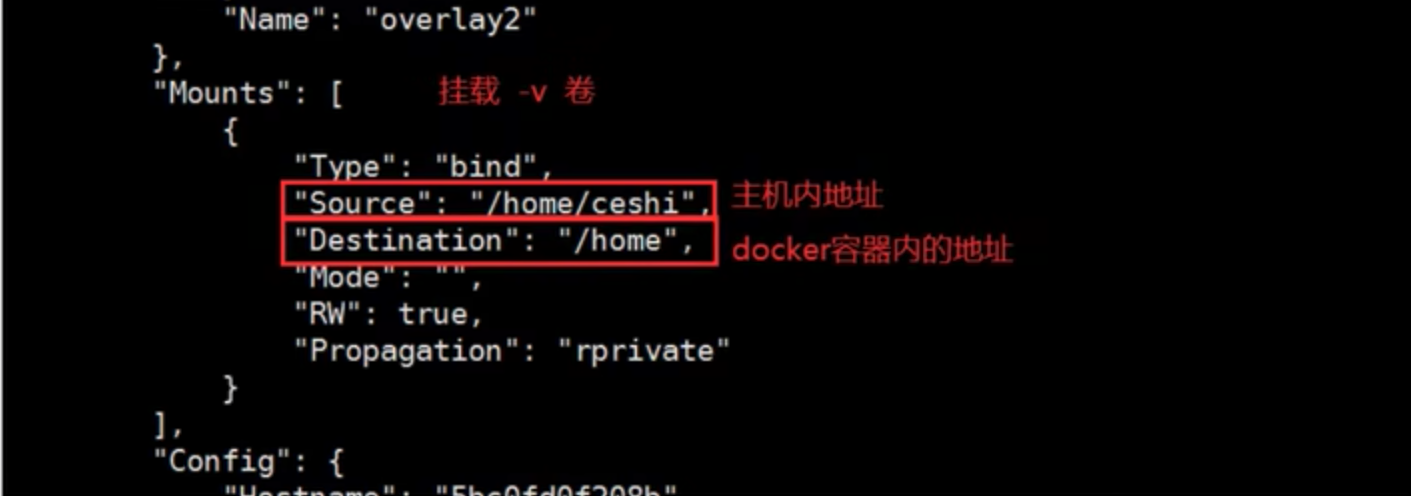
1 概述原理 Docker:将应用和环境打包成一个镜像 数据?如果数据在容器中,那么我们容器删除,数据就会丢失。需求:数据持久化。 所以:Mysql的数据可以存储在本地。 所以:容器间可以有一个数据共享的技术。 Docker容器中产生的数据,同步到本地。这就是卷技术。 本质上是一种目录挂载,将容器内的目录,挂载到宿主机上。 总结:容器的持久化和同步操作,容器间可以数据共享 使用 -v 实现文件映射 12345docker run -it -v 目录映射 -p 端口映射# -it 交互式# -v volume卷技术# -p 主机端口➜ ~ docker run -it -v /Users/yinkanglong/ceshi:/home centos /bin/bash 使用docker inspect 查看挂载情况mount 同步的过程,是一种双向绑定的过程。容器停止后,修改主机文件,再启动容器的时候,数据同样改变 是同步的过程,还是目录挂载到磁盘的同一个位置了? 实战:安装Mysql123456789101112131415# 获取镜像docker pu...

2021-12-24
apt-get
apt-getDebian Linux发行版中的APT软件包管理工具 补充说明apt-get命令 是Debian Linux发行版中的APT软件包管理工具。所有基于Debian的发行都使用这个包管理系统。deb包可以把一个应用的文件包在一起,大体就如同Windows上的安装文件。 语法1apt-get [OPTION] PACKAGE 选项1234567891011apt-get install # 安装新包apt-get remove # 卸载已安装的包(保留配置文件)apt-get purge # 卸载已安装的包(删除配置文件)apt-get update # 更新软件包列表apt-get upgrade # 更新所有已安装的包apt-get autoremove # 卸载已不需要的包依赖apt-get dist-upgrade # 自动处理依赖包升级apt-get autoclean # 将已经删除了的软件包的.deb安装文件从硬盘中删除掉apt-get clean # 删除软件包的安装包-c:指定配置文件。 参数 管理指令:对...
2021-12-24
logwatch
logwatch可定制和可插入式的日志监视系统 补充说明logwatch命令 是一个可定制和可插入式的日志监视系统,它通过遍历给定时间范围内的系统日志文件而产生日志报告。logwatch默认每天执行一次,可以从/etc/cron.daily里看到。 语法1logwatch(选项) 选项12345678910111213--detail<报告详细程度>:指定日志报告的详细程度;--logfile<日志文件>:仅处理指定的日志文件;--service<服务名>:仅处理指定服务的日志文件;--print:打印结果到标准输出;--mailto<邮件地址>:将结果发送到指定邮箱;--range<日期范围>:指定处理日志的日期范围;--archives:处理归档日志文件;--debug<调试等级>:调试模式;--save<文件名>:将结果保存到指定文件中,而不显示或者发送到指定邮箱;--logdir<目录>:指定查找日志文件的目录,而不使用默认的日志目录;--hostname<主机名>...

2021-12-24
md5sum
md5sum计算和校验文件报文摘要的工具程序 补充说明md5sum命令 采用MD5报文摘要算法(128位)计算和检查文件的校验和。一般来说,安装了Linux后,就会有md5sum这个工具,直接在命令行终端直接运行。 MD5算法常常被用来验证网络文件传输的完整性,防止文件被人篡改。MD5 全称是报文摘要算法(Message-Digest Algorithm 5),此算法对任意长度的信息逐位进行计算,产生一个二进制长度为128位(十六进制长度就是32位)的“指纹”(或称“报文摘要”),不同的文件产生相同的报文摘要的可能性是非常非常之小的。 语法1md5sum(选项)(参数) 选项12345-b:二进制模式读取文件;-t或--text:把输入的文件作为文本文件看待;-c:从指定文件中读取MD5校验和,并进行校验;--status:验证成功时不输出任何信息;-w:当校验不正确时给出警告信息。 参数文件:指定保存着文件名和校验和的文本文件。 实例使用 md5sum 生成密码 另一种获取可用作密码的随机字符串的方法是计算 MD5 校验值!校验值看起来确实像是随机字符串组合在一起,我们可以...

2021-12-24
dpkg-divert
dpkg-divertDebian Linux中创建并管理一个转向列表 补充说明dpkg-divert命令 是Debian Linux中创建并管理一个转向(diversion)列表,其使得安装文件的默认位置失效的工具。 语法1dpkg-divert(选项)(参数) 选项12345--add:添加一个转移文件;--remove:删除一个转移文件;--list:列出匹配的转移;--truename:对应转移文件真实文件名;--quidet:安静模式。 参数文件:指定转移文件名。 实例指定软件包wibble安装时,写入/usr/bin/example.foo,而不是/usr/bin/example: 1dpkg-divert --package wibble --divert /usr/bin/example.foo --rename /usr/bin/example 指定软件包wibble安装时,删除对/usr/bin/example的转移修改: 1dpkg-divert --package wibble --rename --remove /usr/bin/example ...

2023-09-09
01 简介
Helm1 简介概念Helm 是 Deis 开发的一个用于 Kubernetes 应用的包管理工具,主要用来管理 Charts。 类似于:Ubuntu 中的 APT、CentOS 中的 YUM。主要功能: 创建:创建新的charts 打包:将charts打包成tgz文件 交互:与chart仓库交互 安装:安装和卸载K8s的应用 管理:管理使用Helm安装的charts的生命周期 2 安装与仓库前置条件 kubernets集群 安装配置helm 安装1curl https://raw.githubusercontent.com/helm/helm/main/scripts/get-helm-3 | bash 自动补全123#设置命令自动补全echo 'source <(helm completion bash)' >> /etc/profile. /etc/profile #重载环境变量 配置helm仓库123456789#查看其仓库信息helm repo listNAME URL ...




