
7输入输出
格式化字符串
入侵式格式化
- 要使用 格式化字符串字面值 ,请在字符串的开始引号或三引号之前加上一个 f 或 F 。在此字符串中,你可以在 { 和 } 字符之间写可以引用的变量或字面值的 Python 表达式。
1 | >>> |
函数式格式化
- 字符串的 str.format() 方法需要更多的手动操作。你仍将使用 { 和 } 来标记变量将被替换的位置,并且可以提供详细的格式化指令,但你还需要提供要格式化的信息。
1 | >>> |
字符串拼接
- 最后,你可以使用字符串切片和连接操作自己完成所有的字符串处理,以创建你可以想象的任何布局。字符串类型有一些方法可以执行将字符串填充到给定列宽的有用操作。
调试字符串
当你不需要花哨的输出而只是想快速显示某些变量以进行调试时,可以使用 repr() or str() 函数将任何值转化为字符串。
1 | s = 'Hello, world.' |
format
str.format() 方法的基本用法如下所示:
1 | >>> |
花括号和其中的字符(称为格式字段)将替换为传递给 str.format() 方法的对象。花括号中的数字可用来表示传递给 str.format() 方法的对象的位置。
1 | >>> |
如果在 str.format() 方法中使用关键字参数,则使用参数的名称引用它们的值。:
1 | >>> |
位置和关键字参数可以任意组合:
1 | >>> |
本博客所有文章除特别声明外,均采用 CC BY-NC-SA 4.0 许可协议。转载请注明来源 Estom的博客!
相关推荐

2022-12-05
23.JVM 的内存布局和运行原理
说一下 JVM 的内存布局和运行原理?JVM(Java Virtual Machine,Java 虚拟机)顾名思义就是用来执行 Java 程序的“虚拟主机”,实际的工作是将编译的 class 代码(字节码)翻译成底层操作系统可以运行的机器码并且进行调用执行,这也是 Java 程序能够“一次编写,到处运行”的原因(因为它会根据特定的操作系统生成对应的操作指令)。JVM 的功能很强大,像 Java 对象的创建、使用和销毁,还有垃圾回收以及某些高级的性能优化,例如,热点代码检测等功能都是在 JVM 中进行的。因为 JVM 是 Java 程序能够运行的根本,因此掌握 JVM 也已经成了一个合格 Java 程序员必备的技能。 我们本课时的面试题是,说一下 JVM 的内存布局和运行原理? 典型回答JVM 的种类有很多,比如 HotSpot 虚拟机,它是 Sun/OracleJDK 和 OpenJDK 中的默认 JVM,也是目前使用范围最广的 JVM。我们常说的 JVM 其实泛指的是 HotSpot 虚拟机,还有曾经与 HotSpot 齐名为“三大商业 JVM”的 JRockit 和...

2021-12-24
tmux
tmuxTmux是一个优秀的终端复用软件,类似GNU Screen,但来自于OpenBSD,采用BSD授权 补充说明使用它最直观的好处就是,通过一个终端登录远程主机并运行tmux后,在其中可以开启多个控制台而无需再“浪费”多余的终端来连接这台远程主机; 功能 提供了强劲的、易于使用的命令行界面。 可横向和纵向分割窗口。 窗格可以自由移动和调整大小,或直接利用四个预设布局之一。 支持 UTF-8 编码及 256 色终端。 可在多个缓冲区进行复制和粘贴。 可通过交互式菜单来选择窗口、会话及客户端。 支持跨窗口搜索。 支持自动及手动锁定窗口。 安装12345678910111213# 在 Mac OS 中,通过 brew 安装brew install tmux# ubuntu版本下直接apt-get安装sudo apt-get install tmux# centos7版本下直接yum安装yum install -y tmux# centos6版本需要编译安装yum install libevent libevent-devel ncurses-develtar -zvxf tmux...

2021-12-24
rm
rm用于删除给定的文件和目录 补充说明rm 命令 可以删除一个目录中的一个或多个文件或目录,也可以将某个目录及其下属的所有文件及其子目录均删除掉。对于链接文件,只是删除整个链接文件,而原有文件保持不变。 注意:使用rm命令要格外小心。因为一旦删除了一个文件,就无法再恢复它。所以,在删除文件之前,最好再看一下文件的内容,确定是否真要删除。rm命令可以用-i选项,这个选项在使用文件扩展名字符删除多个文件时特别有用。使用这个选项,系统会要求你逐一确定是否要删除。这时,必须输入y并按Enter键,才能删除文件。如果仅按Enter键或其他字符,文件不会被删除。 语法1rm (选项)(参数) 选项123456-d:直接把欲删除的目录的硬连接数据删除成0,删除该目录;-f:强制删除文件或目录;-i:删除已有文件或目录之前先询问用户;-r或-R:递归处理,将指定目录下的所有文件与子目录一并处理;--preserve-root:不对根目录进行递归操作;-v:显示指令的详细执行过程。 参数文件:指定被删除的文件列表,如果参数中含有目录,则必须加上-r或者-R选项。 实例交互式删除当前目录下的文...
2021-09-07
5.3-chinese
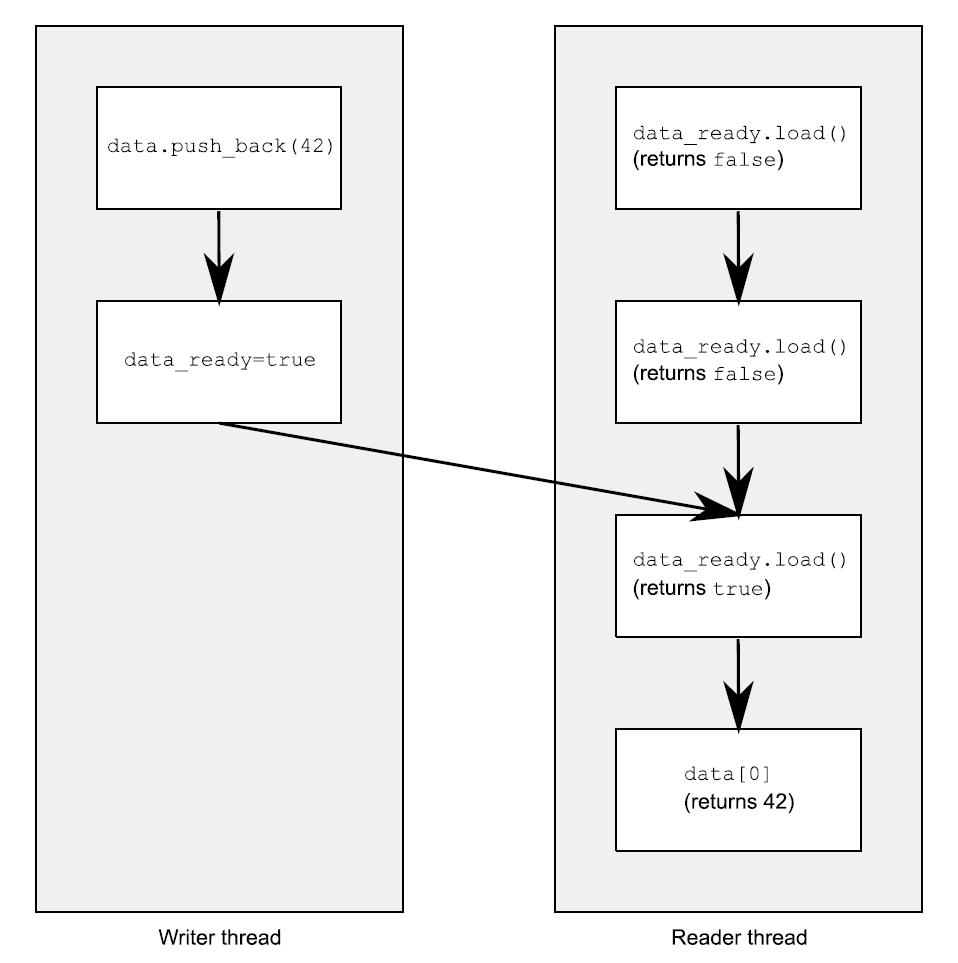
5.3 同步操作和强制排序假设你有两个线程,一个向数据结构中填充数据,另一个读取数据结构中的数据。为了避免恶性条件竞争,第一个线程设置一个标志,用来表明数据已经准备就绪,并且第二个线程在这个标志设置前不能读取数据。下面的程序清单就是这样的情况。 清单5.2 不同线程对数据的读写 1234567891011121314151617181920#include <vector>#include <atomic>#include <iostream>std::vector<int> data;std::atomic<bool> data_ready(false);void reader_thread(){ while(!data_ready.load()) // 1 { std::this_thread::sleep(std::milliseconds(1)); } std::cout<<"The answer="<<data[0]<...

2021-12-24
vgextend
vgextend向卷组中添加物理卷 补充说明vgextend命令 用于动态扩展LVM卷组,它通过向卷组中添加物理卷来增加卷组的容量。LVM卷组中的物理卷可以在使用vgcreate命令创建卷组时添加,也可以使用vgextend命令动态的添加。 语法1vgextend(选项)(参数) 选项12-d:调试模式;-t:仅测试。 参数 卷组:指定要操作的卷组名称; 物理卷列表:指定要添加到卷组中的物理卷列表。 实例使用vgextend命令向卷组”vg2000”中添加物理卷。在命令行中输入下面的命令: 1[root@localhost ~]# vgextend vg2000 /dev/sdb2 #将物理卷"/dev/sdb2"加入卷组"vg2000" 输出信息如下: 1Volume group "vg2000" successfully extended

2020-09-26
dolphin
绘制海豚此示例显示如何使用Path,PathPatch和transforms类绘制和操作给定顶点和节点的形状。 123456789101112131415161718192021222324252627282930313233343536373839404142434445464748495051525354555657585960616263646566676869707172737475767778798081828384858687888990919293import matplotlib.cm as cmimport matplotlib.pyplot as pltfrom matplotlib.patches import Circle, PathPatchfrom matplotlib.path import Pathfrom matplotlib.transforms import Affine2Dimport numpy as np# Fixing random state for reproducibilitynp.random.seed(19680801)r ...



