
12ndimage
ndimage用途
SciPy的ndimage子模块专用于图像处理。这里,ndimage表示一个n维图像。
图像处理中一些最常见的任务如下:
- 输入/输出/显示图像
- 基本操作:裁剪,翻转,旋转等图像过滤
- 去噪,锐化等图像分割
- 标记对应于不同对象的像素
- 分类
- 特征提取
- 注册/配准
示例
1 | # 导入图像 |
本博客所有文章除特别声明外,均采用 CC BY-NC-SA 4.0 许可协议。转载请注明来源 Estom的博客!
相关推荐

2021-09-07
8.6-chinese
8.6 本章总结本章我们讨论了很多东西。我们从划分线程间的工作开始(比如,数据提前划分或让线程形成流水线)。之后,以低层次视角来看多线程下的性能问题,顺带了解了伪共享和数据通讯;了解访问数据的模式对性能的影响。再后,了解了附加注意事项是如何影响并发代码设计的,比如:异常安全和可扩展性。最后,用一些并行算法实现来结束了本章,在设计这些并行算法实现时碰到的问题,在设计其他并行代码的时候也会遇到。 本章中,关于线程池的部分被转移了。线程池——一个预先设定的线程组,会将任务指定给池中的线程。很多不错的想法可以用来设计一个不过的线程池;所以我们将在下一章中来看一些有关线程池的问题,以及高级线程管理方式。

2019-11-30
12 类和对象
Scala 类和对象1 基本概念类是对象的抽象,而对象是类的具体实例。类是抽象的,不占用内存,而对象是具体的,占用存储空间。类是用于创建对象的蓝图,它是一个定义包括在特定类型的对象中的方法和变量的软件模板。 我们可以使用 new 关键字来创建类的对象,实例如下: class Point(xc: Int, yc: Int) { var x: Int = xc var y: Int = yc def move(dx: Int, dy: Int) { x = x + dx y = y + dy println (“x 的坐标点: “ + x); println (“y 的坐标点: “ + y); }}Scala中的类不声明为public,一个Scala源文件中可以有多个类。 以上实例的类定义了两个变量 x 和 y ,一个方法:move,方法没有返回值。 Scala 的类定义可以有参数,称为类参数,如上面的 xc, yc,类参数在整个类中都可以访问。 接着我们可以使用 new 来实例化类,并...

2022-07-11
01 Object类
Object 通用方法概览java.lang.Object类是Java语言中的根类,即所有类的父类。它中描述的所有方法子类都可以使用。在对象实例化的时候,最终找的父类就是Object。 如果一个类没有特别指定父类, 那么默认则继承自Object类。 123456789101112public native int hashCode()public boolean equals(Object obj)protected native Object clone() throws CloneNotSupportedExceptionpublic String toString()public final native Class<?> getClass()protected void finalize() throws Throwable {}public final native void notify()public final native void notifyAll()public final native void wait(long tim...
2022-12-04
10-v-model
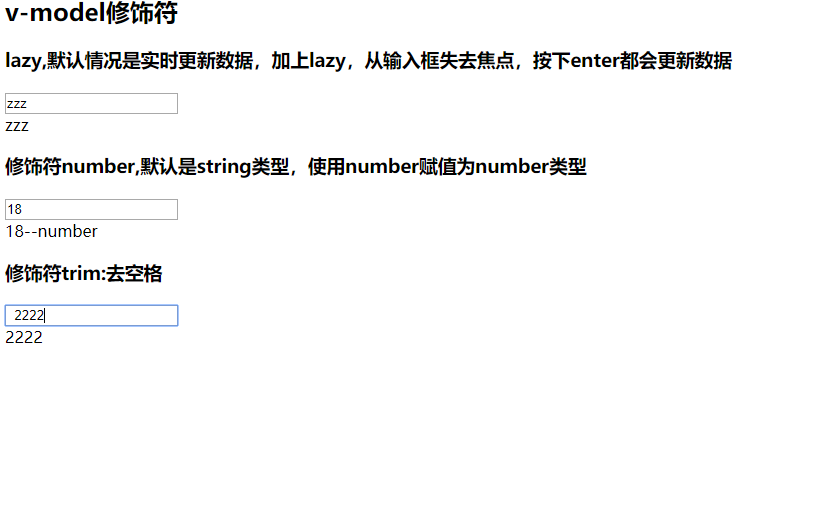
# 1. v-model的基本使用 123456789101112131415161718192021<!DOCTYPE html><html lang="en"><head> <meta charset="UTF-8"> <title>Title</title></head><body><div id="app"> <input type="text" v-model="message">{{message}}</div><script src="../js/vue.js"></script><script> const app = new Vue({ el: '#app', ...

2021-03-09
Scrapy框架学习——Items使用
>准确的说,scrapy主要就有两部分可以编辑,一个使用来处理数据的scrapy.Items,另一个用来仓库 Item的操作包括创建、获取字段的值、设置字段的值、后去所欲的键、获取product列表、获取product字段、社赋值和浅复制、集成扩展item。 Item对象的操作 fields内置字段,是item生命中使用到的field对象的名字,是一个字典。
2022-10-02
jvm gc机制说明
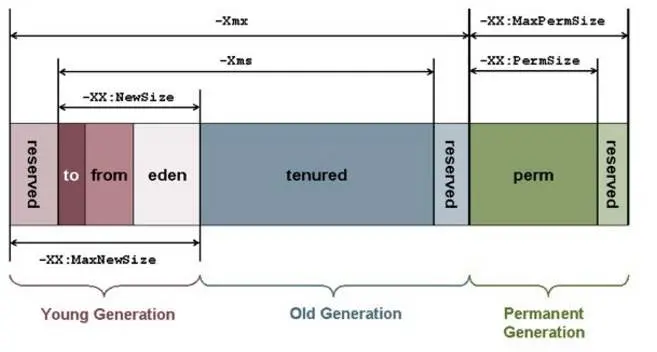
1 GC的方式与过程 参考文档 https://blog.51cto.com/u_14962799/2739752关键词:伊甸园区,幸存区,年轻代,年老代,持久代 JVM内存的大致结构 年轻代(young generation) 两个幸存区(survivor) 一个伊甸区(eden) 老年代(old generation) 吃就带(perm) GC的工作过程 持久代:当类加载时,我们会将.class文件中的部分信息加载到持久区中,比如类的修饰符,字段属性和方法信息等。又或者时import引入类的信息。都叫持久代了,也就说明这块区间的内存相对稳定,垃圾回收一般也就没持久代啥事儿。 伊甸园区:伊甸园区好理解,希腊神话中人类诞生的地方。因此,当我们创建对象时,比如:new String(“123”);即JVM在伊甸园区创建了一个对象,对象里面装的是String类型的数据123。 幸存区:当伊甸园区的内存占满了,而又需要创建对象时,JVM就会像伊甸园区还活着的(被引用的对象),拷贝到幸存区去。此时其实会调用一此Minor GC操作,也可以称为迷你的垃圾回收动作,该动做就会将...




