
poly_editor
综合编辑器
这是一个示例,展示如何使用Matplotlib事件处理来构建跨GUI应用程序,以与画布上的对象进行交互。

1 | import numpy as np |
下载这个示例
本博客所有文章除特别声明外,均采用 CC BY-NC-SA 4.0 许可协议。转载请注明来源 Estom的博客!
相关推荐

2021-03-20
25
# 2.6. 协方差估计 校验者: [@李昊伟](https://github.com/apachecn/scikit-learn-doc-zh) [@小瑶](https://github.com/apachecn/scikit-learn-doc-zh) [@Loopy](https://github.com/loopyme) [@barrycg](https://github.com/barrycg) 翻译者: [@柠檬](https://github.com/apachecn/scikit-learn-doc-zh) 许多统计问题需要估计一个总体的协方差矩阵,这可以看作是对数据集散点图形状的估计。大多数情况下,必须对某个样本进行这样的估计,当它的属性(如尺寸,结构,均匀性)对估计质量有重大影响时。*sklearn.covariance* 包的目的是提供一个能在各种设置下准确估计总体协方差矩阵的工具。 我们假设观察是独立的,相同分布的 (i.i.d.)。 ## 2.6.1. 经验协方差 ...
2021-04-08
4.5 中介者
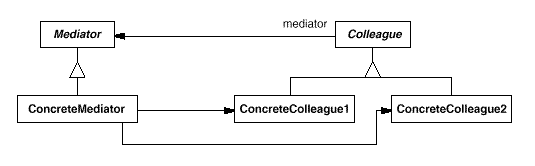
意图 用一个中介对象来封装一系列的对象交互。 中介者使各对象不需要显式地相互引用,从而使其耦合松散,而且可以独立地改变它们之间的交互。 Define an object that encapsulates how a set of objects interact. Mediator promotes loose coupling by keeping objects from referring to each otherexplicitly, and it lets you vary their interaction independently. 结构 一个典型的对象结构: 参与者 Mediator 中介者定义一个接口用于与各同事对象通信。 ConcreteMediator 具体中介者通过协调各同事对象实现协作行为。 了解并维护它的各个同事。 Colleague 每一个同事类都知道它的中介者。 每一个同事对象在需与其他同事通信时,与它的中介者通信。 适用性 在以下情况下可以使用 Mediator 模式: 一组对象定义良好但是使用复杂的通信方式。产生的...
2022-10-09
01 1IOC容器原理
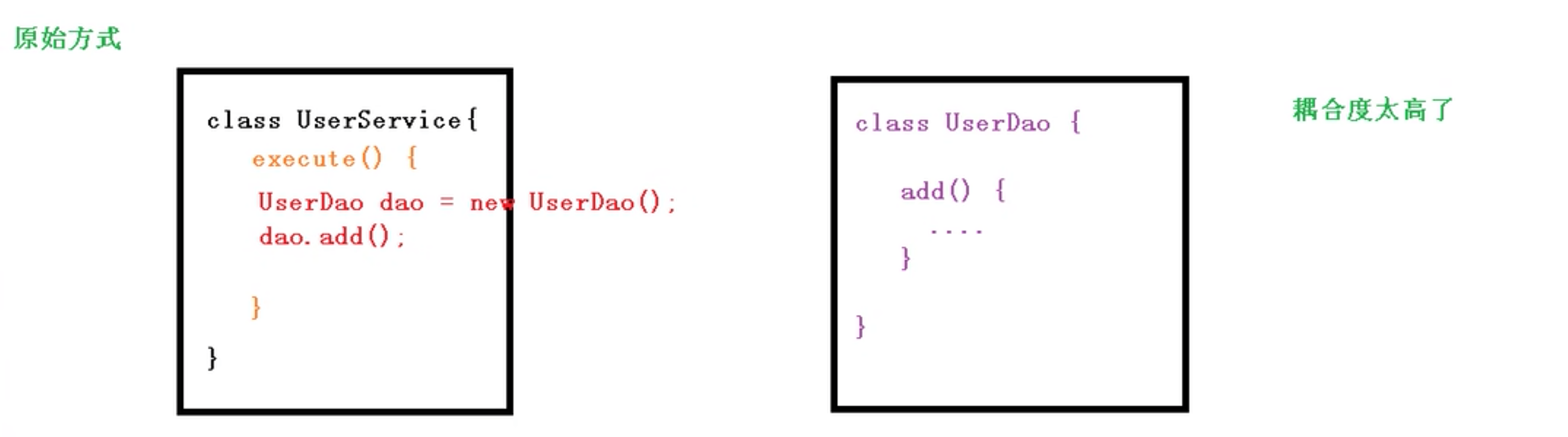
1 IOC容器原理IOC概念 控制反转。把对象创建和对象调用的过程,交给Spring进行管理。 使用IOC的目的:降低代码耦合度。 底层原理 xml解析 工厂模式 反射 java对象调用的过程 1234567891011class UserDao{ add(){ }}public class UserService{ public void execute(){ UserDao dao = new UserDao(); dao.add(); }} 使用工厂模式 1234567891011121314151617class UserDao{ add(){ }}class UserFactory{ public static UserDao getDao(){ return new UserDao(); }}class Us...

2020-09-26
path_editor
路径编辑器跨GUI共享事件。 此示例演示了使用Matplotlib事件处理与画布上的对象进行交互和修改对象的跨GUI应用程序。 123456789101112131415161718192021222324252627282930313233343536373839404142434445464748495051525354555657585960616263646566676869707172737475767778798081828384858687888990919293949596979899100101102103104105106107108109110111112113114115116117118119120121122123124125126127128129130131132133134135136137138139140141142143144145146147148149import numpy as npimport matplotlib.path as mpathimport matplotlib.patches as mpatchesimport ...
2020-10-14
03目标检测
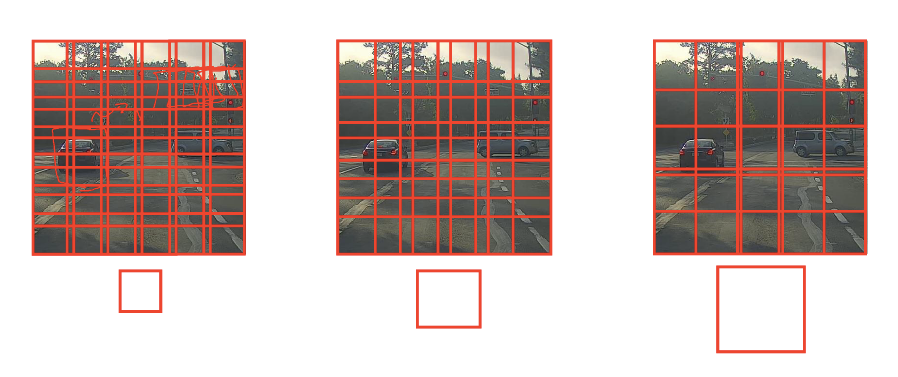
目标检测 目标检测是计算机视觉领域中一个新兴的应用方向,其任务是对输入图像进行分类的同时,检测图像中是否包含某些目标,并对他们准确定位并标识。 1 目标定位 定位分类问题不仅要求判断出图片中物体的种类,还要在图片中标记出它的具体位置,用**边框(Bounding Box,或者称包围盒)**把物体圈起来。一般来说,定位分类问题通常只有一个较大的对象位于图片中间位置;而在目标检测问题中,图片可以含有多个对象,甚至单张图片中会有多个不同分类的对象。 为了定位图片中汽车的位置,可以让神经网络多输出 4 个数字,标记为 $b_x$、$b_y$、$b_h$、$b_w$。将图片左上角标记为 (0, 0),右下角标记为 (1, 1),则有: 红色方框的中心点:($b_x$,$b_y$) 边界框的高度:$b_h$ 边界框的宽度:$b_w$ 因此,训练集不仅包含对象分类标签,还包含表示边界框的四个数字。定义目标标签 Y 如下: $$\left[\begin{matrix}P_c\\ b_x\\ b_y\\ b_h\\ b_w\\ c_1\\ c_2\\ c_3\end{matrix}\...

2020-09-26
irregulardatagrid
不规则空间数据的等高线图不规则空间数据在规则网格上插值的等高线图与非结构三角形网格的三棱图的比较。 由于 contour 和 contourf 期望数据存在于规则网格上,因此绘制不规则间隔数据的等高线图需要不同的方法。这两个选项是: 首先将数据插值到常规网格。这可以通过机载装置完成,例如,通过LinearTriInterpolator或使用外部功能,例如 通过scipy.interpolate.griddata。然后用常规的等高线绘制插值数据。 直接使用tricontour或tricontourf,它将在内部进行三角测量。 此示例显示了两种方法。 123456789101112131415161718192021222324252627282930313233343536373839404142434445464748495051525354555657585960616263import matplotlib.pyplot as pltimport matplotlib.tri as triimport numpy as npnp.random.seed(19680801)...




