
anchored_artists
锚定艺术家对象
这个使用没有辅助类的锚定对象的示例在Matplotlib axes_grid1 Toolkit中找到。此版本的图与Simple Anchored Artists中的版本类似,但它仅使用matplotlib命名空间实现,没有其他工具包的帮助。

1 | from matplotlib import pyplot as plt |
下载这个示例
本博客所有文章除特别声明外,均采用 CC BY-NC-SA 4.0 许可协议。转载请注明来源 Estom的博客!
相关推荐
2021-04-10
4.9 策略
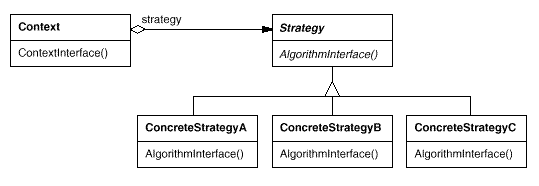
策略 Strategy别名 Policy 意图定义一系列的算法,把它们一个个封装起来,并且使它们可以相互替换。使得算法可独立于使用它的客户而变化。 结构 参与者Strategy 定义所有支持的算法的公共接口。Context 使用这个接口来调用 ConcreteStrategy 定义的算法。 ConcreteStrategy 实现 Strategy 接口和具体算法。 Context 用一个 ConcreteStrategy 对象来配置。 维护一个对 Strategy 对象的引用。 可定义一个接口来让 Strategy 访问它的数据。 适用性在以下情况下可以使用 Strategy 模式: 许多相关的类仅仅是行为有异。Strategy 提供了一种用多个行为中的一个行为来配置一个类的方法。 需要使用一个算法的不同变体。 算法使用客户不应该知道的数据。 一个类定义了多种行为,并且这些行为在这个类的操作中以多个条件语句的形式出现。将相关条件分支移入它们各自的 Strategy 类中以代替。 缺点 客户必须了解不同的 Strategy。要选择合适的 Str...

2020-09-26
simple_anchored_artists
简单锚定艺术家对象示例此示例说明如何使用在 offsetbox 和 Matplotlib axes_grid1 Toolkit 中找到的锚定辅助对象类。类似图形的实现,但不使用工具包,可以在锚定的艺术家对象中找到。 12345678910111213141516171819202122232425262728293031323334353637383940414243444546474849505152535455565758596061626364656667686970717273import matplotlib.pyplot as pltdef draw_text(ax): """ Draw two text-boxes, anchored by different corners to the upper-left corner of the figure. """ from matplotlib.offsetbox import AnchoredText at = Anc...

2019-11-30
4 访问修饰符
Scala 访问修饰符Scala 访问修饰符基本和Java的一样,分别有:private,protected,public。 如果没有指定访问修饰符,默认情况下,Scala 对象的访问级别都是 public。 Scala 中的 private 限定符,比 Java 更严格,在嵌套类情况下,外层类甚至不能访问被嵌套类的私有成员。 1 私有(Private)成员用 private 关键字修饰,带有此标记的成员仅在包含了成员定义的类或对象内部可见,同样的规则还适用内部类。 class Outer{ class Inner{ private def f(){println(“f”)} class InnerMost{ f() // 正确 } } (new Inner).f() //错误}(new Inner).f( ) 访问不合法是因为 f 在 Inner 中被声明为 private,而访问不在类 Inner 之内。 但在 InnerMost 里访问 f 就没有问题的,因为这个访问包含在 I...
2021-03-09
5.7 Role Object(角色对象)
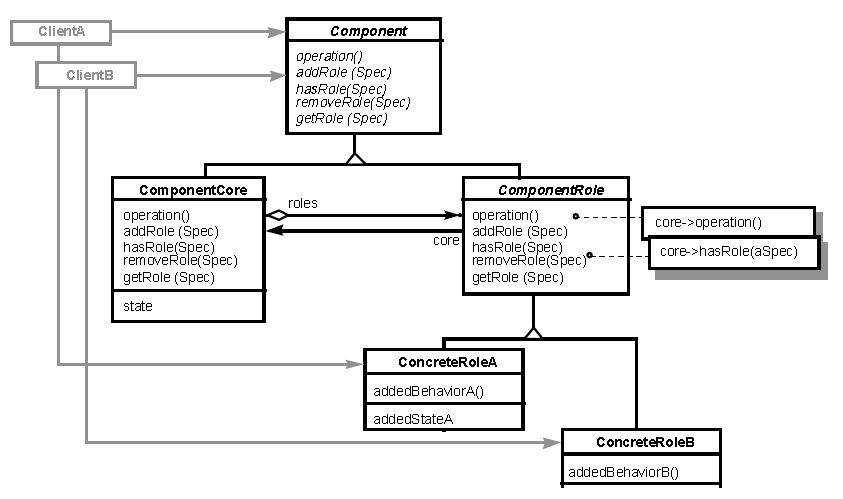
索引 意图 结构 参与者 适用性 效果 相关模式 实现 实现方式(一):Role Object 的示例实现。 意图 通过明确地附加角色对象到目标对象中,以使对象可以适配不同的客户需求。每个角色对象都代表着目标对象在客户上下文中的一种角色。每种上下文都存在于特定的应用程序中,因此可使对象在不同的应用程序间解耦。 Adapt an object to different client’s needs through transparently attached roleobjects, each one representing a role the object has to play in that client’scontext. Each context may be its own application, which therefore gets decoupledfrom the other applications. 结构 参与者 Component 定义关键的抽象接口。 定义添加、删除、测试和查询角色对象的接口协议。Client 可以指定...
2021-04-08
2.4 抽象工厂
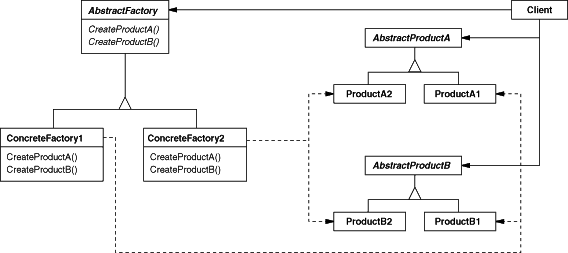
抽象工厂abstract factory1 概念别名 Kit 意图提供一个创建一系列相关或相互依赖对象的接口,而无需指定它们具体的类。 结构抽象工厂模式创建的是对象家族,也就是很多对象而不是一个对象,并且这些对象是相关的,也就是说必须一起创建出来。而工厂方法模式只是用于创建一个对象,这和抽象工厂模式有很大不同。 抽象工厂模式用到了工厂方法模式来创建单一对象,AbstractFactory 中的 createProductA() 和 createProductB() 方法都是让子类来实现,这两个方法单独来看就是在创建一个对象,这符合工厂方法模式的定义。 至于创建对象的家族这一概念是在 Client 体现,Client 要通过 AbstractFactory 同时调用两个方法来创建出两个对象,在这里这两个对象就有很大的相关性,Client 需要同时创建出这两个对象。 从高层次来看,抽象工厂使用了组合,即 Cilent 组合了 AbstractFactory,而工厂方法模式使用了继承。 参与者AbstractFactory 声明一个创建抽象产品对象的操作接口。 Concrete...
2021-04-08
06 面向对象的三大特征
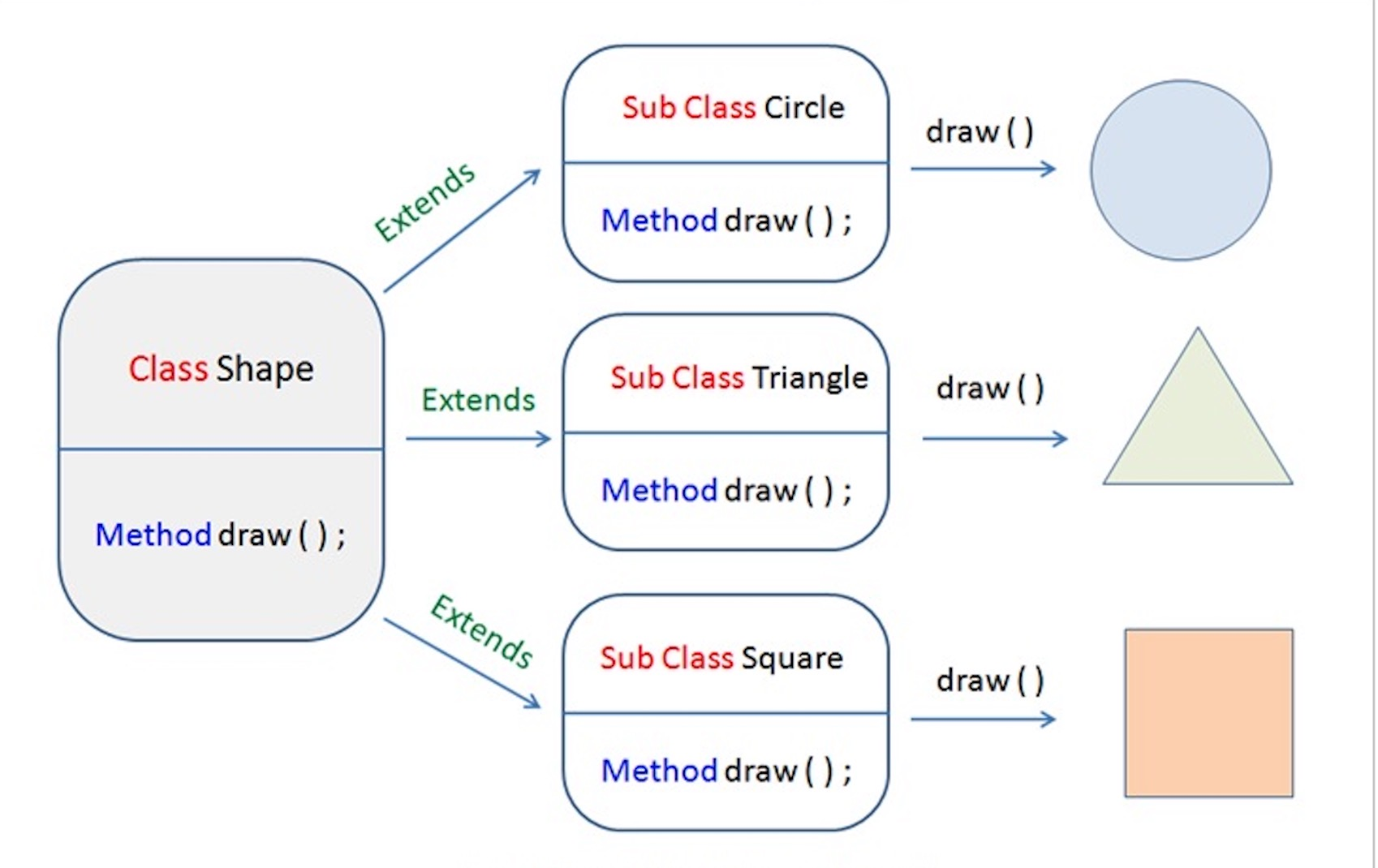
面相对象的三大特征 1封装 2 继承 3 多态 4 重写、重载、重定义 定义 重写的原则 与重载的区别 方法访问的优先级 面相对象的三大特征1封装高内聚、低耦合。属性私有。 隐藏实现的细节。将抽象性函式接口的实现细节部分包装、隐藏起来的方法。 提高系统的安全性。在getset中对输入数据进行安全检查。封装可以被认为是一个保护屏障,防止该类的代码和数据被外部类定义的代码随机访问。要访问该类的代码和数据,必须通过严格的接口控制。 提供统一的接口 更容易理解与维护。 实现封装的步骤 修改属性的可见性来限制对属性的访问(一般限制为private) 对每个值属性提供对外的公共方法访问,也就是创建一对赋取值方法,用于对私有属性的访问。get/set方法 2 继承继承的定义 继承就是子类继承父类的特征和行为,使得子类对象(实例)具有父类的实例域和方法,或子类从父类继承方法,使得子类具有父类相同的行为。 继承本质上是一种代码复用的方法。也提高了代码的耦合程度。 所有没有父类的类默认继承Object类。 12345class 父类 {} cla...




