
contour_manual
Contour手册
使用ContourSet显示自己的轮廓线和多边形的示例。
1 | import matplotlib.pyplot as plt |
每个级别的轮廓线是多边形的列表/元组。
1 | lines0 = [[[0, 0], [0, 4]]] |
两个级别之间的填充等高线也是多边形的列表/元组。点可以顺时针或逆时针排列。
1 | filled01 = [[[0, 0], [0, 4], [1, 3], [1, 2], [2, 0]]] |
1 | plt.figure() |

可以在单个多边形顶点列表中指定多个填充轮廓线以及Path类中描述的顶点种类(代码类型)列表。 这对于带孔的多边形特别有用。 代码类型1是MOVETO,2是LINETO。
1 | plt.figure() |

下载这个示例
本博客所有文章除特别声明外,均采用 CC BY-NC-SA 4.0 许可协议。转载请注明来源 Estom的博客!
相关推荐

2022-07-10
06 Scanner
Scanner基本使用方法12345678910Scanner s = new Scanner(System.in);s.next();s.nextLine();s.hasNext();s.hasNextLine();//尽量关闭掉 s.close(); 读取不同类型的数据 读取会阻塞,但是读取错误的数据会返回false 没有数据——阻塞 有数据,类型正确——true 有数据,类型错误——false 1234567891011121314151617181920212223242526272829303132333435363738394041package com.ykl;import java.util.Scanner;public class ScannerTest { public static void main(String[] args) { Scanner s = new Scanner(System.in); System.out.println("使用不同的方式读取数据"); ...

2022-12-05
08 随机数Random
2 Random简介在 Java中要生成一个指定范围之内的随机数字有两种方法:一种是调用 Math 类的 random() 方法,一种是使用 Random 类。 Random():该构造方法使用一个和当前系统时间对应的数字作为种子数,然后使用这个种子数构造 Random 对象。Random(long seed):使用单个 long 类型的参数创建一个新的随机数生成器。 Random 类提供的所有方法生成的随机数字都是均匀分布的,也就是说区间内部的数字生成的概率是均等的 实例123456789101112131415161718192021package cn.itcast.demo1; import java.util.Random;//使用时需要先导包import java.util.Scanner; public class RAndom { public static void main(String[] args) { Random r = new Random();//以系统自身时间为种子数 int i = r.n...

2025-09-03
03 数据结构
结构体结构体定义结构体和我们在“元组类型”章节论过的元组类似。和元组一样,结构体的每一部分可以是不同类型。但不同于元组,结构体需要命名各部分数据以便能清楚的表明其值的意义。由于有了这些名字,结构体比元组更灵活:不需要依赖顺序来指定或访问实例中的值。 定义结构体,需要使用 struct 关键字并为整个结构体提供一个名字。结构体的名字需要描述它所组合的数据的意义。接着,在大括号中,定义每一部分数据的名字和类型,我们称为 字段(field)。例如,示例 5-1 展示了一个存储用户账号信息的结构体: 12345678struct User { active: bool, username: String, email: String, sign_in_count: u64,}fn main() {} 结构体使用通过为每个字段指定具体值的方式来创建该结构体的实例。创建一个实例需要以结构体的名字开头,接着在大括号中使用 key: value 键-值对的形式提供字段,其中 key 是字段的名字,value 是需要存储在字段中的数...

2021-09-02
3-基本数据类型
3 基本数据类型基本数据类型包括:整型、浮点型、布尔型、字符串。 除以上基本类型之外,还有 数组、切片、结构体、函数、map、通道 等。 3.1 整型3.1.1 整型整型分为:int8、int16、int32、int64 ,以及对应的无符号整型:uint8、uint16、uint32、uint64 其中 unit8 对应其他语言中的 byte 类型;int16 对应 C 语言中的 short 类型;int64 对应 C 语言中的 long 类型。 各数据类型及对应的取值关系如下: 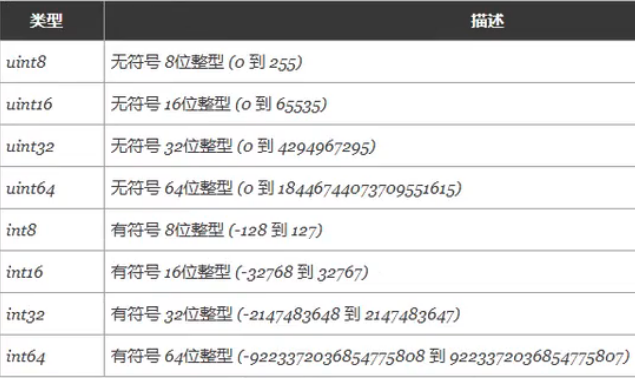 特殊整型: 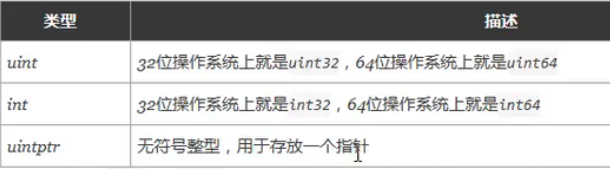 注意: 获取对象的长度时,内建的 len() 函数返回的长度可以根据不同平台的字节长度进行变化。实际使用中,切片或 map 的元素数量等都可以直接使用 int 来表示 。 3.1.2 八进制...
2022-12-04
10-v-model
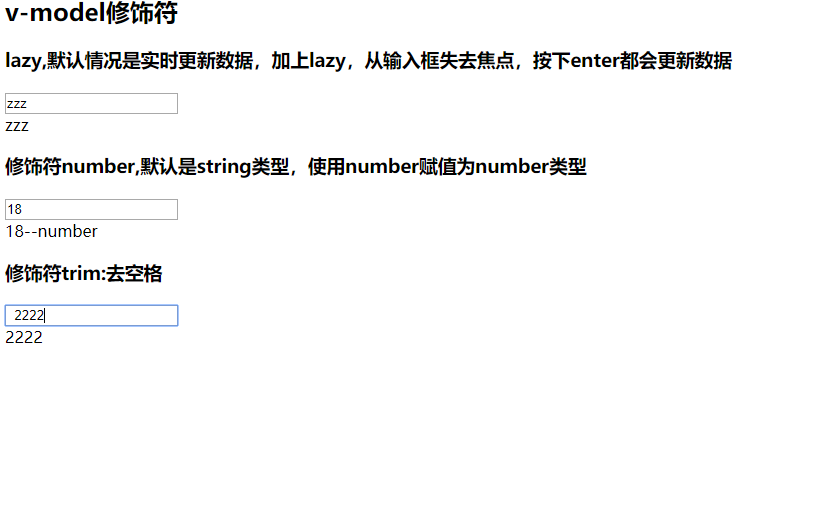
# 1. v-model的基本使用 123456789101112131415161718192021<!DOCTYPE html><html lang="en"><head> <meta charset="UTF-8"> <title>Title</title></head><body><div id="app"> <input type="text" v-model="message">{{message}}</div><script src="../js/vue.js"></script><script> const app = new Vue({ el: '#app', ...

2022-07-10
04 Java数组
Java 数组 1 概述 概念 数组声明 数组定义 数组遍历 数组参数 数组返回值 多维数组 Java 数组1 概述概念Java 语言中提供的数组是用来存储固定大小的同类型元素。 数组声明12dataType[] arrayRefVar; // 首选的方法dataType arrayRefVar[]; // 效果相同,但不是首选方法 数组定义 使用new关键字和数组的大小创建数组。数组中的每一个元素都使用默认初始化。基本类型被初始化位数值,引用类型被初始化位空。 使用花括号和数组中的元素,创建数组 12dataType[] arrayRefVar = new dataType[arraySize];dataType[] arrayRefVar = {value0, value1, ..., valuek}; 数组遍历数组的元素类型和数组的大小都是确定的,所以当处理数组元素时候,我们通常使用基本循环或者 For-Each 循环。 for遍历 12345678910111213141516171819202122public clas...




