
auto_subplots_adjust
自动调整子图
自动调整子图参数。 此示例显示了一种使用draw_event上的回调从ticklabels范围确定subplot参数的方法。
请注意,使用tight_layout或 constrained_layout 可以实现类似的结果; 此示例显示了如何自定义子图参数调整。
1 | import matplotlib.pyplot as plt |

参考
此示例中显示了以下函数,方法,类和模块的使用:
1 | import matplotlib |
下载这个示例
本博客所有文章除特别声明外,均采用 CC BY-NC-SA 4.0 许可协议。转载请注明来源 Estom的博客!
相关推荐

2022-10-19
11 Rest接口
1 概述基本概念JSR(Java Specification Request)-Java规范提案 jax-rs对应JSR370。jax-rs全称Java API for RESTful Services。 java.ws.rs是jax-rs规范中定义的包名。 jax-rs中定义了 一组启动方式 (以jee作为http容器 还是配合servlet作为http容器) 一组注解@GET, @POST, @DELETE, @PUT, @Consumes … 通过 POJO Resource类 提供Rest服务 实现框架 Apache CXF开源的Web服务框架 Jersey 由Sun提供的JAX-RS的参考实现 RESTEasy JBoss的实现 Restlet 由Jerome Louvel和Dave Pawson开发 是最早的REST框架 先于JAX-RS出现 Apache Wink 一个Apache软件基金会孵化器中的项目 其服务模块实现JAX-RS规范 JSR2 注解@Path注解位置 类注解 方法注解 标注class时 表明该类是个资源类 凡是资源类必须使用该注解 标注me...
2022-12-27
02 AOP详解
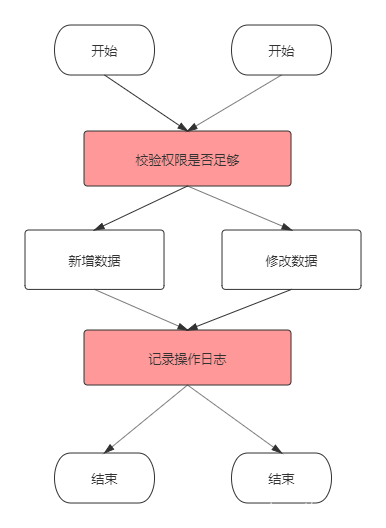
1 概述概念AOP(Aspect Oriented Programming)面向切面思想,是Spring的三大核心思想之一(AOP-面向切面、IOC-控制反转、DI-依赖注入)。 为什么AOP 有多少个业务操作,就要写多少重复的校验和日志记录代码,这显然是无法接受的。当然用面向对象的思想,可以把这些重复的代码抽离出来,写成公共方法,就是下面这样: 代码冗余和可维护性的问题得到了解决,但每个业务方法中依然要依次手动调用这些公共方法,也是略显繁琐。 有没有更好的方式呢?有的,那就是AOP,AOP将权限校验、日志记录等非业务代码完全提取出来,与业务代码分离,并寻找节点切入业务代码中 AOP体系结构AOP要做的三件事: 在哪里切入,也就是权限校验等非业务操作在哪些业务代码中执行;(切入点) 什么时候切入,是业务代码执行前还是执行后;(通知) 切入后做什么事,比如做权限校验、日志记录等。 Pointcut:切点,决定处理如权限校验、日志记录等在何处切入业务代码中(即织入切面)。切点分为execution方式和annotation方式。前者可以用路径表达式指定哪些类织入切面,后者可...

2021-05-09
88 API-torch.optim
torch.optim1 使用优化器构造优化器要构造一个,Optimizer您必须为其提供一个包含参数的可迭代项(所有参数都应为Variables)以进行优化。然后,您可以指定优化器特定的选项,例如学习率,权重衰减等。 12optimizer = optim.SGD(model.parameters(), lr=0.01, momentum=0.9)optimizer = optim.Adam([var1, var2], lr=0.0001) 使用优化器所有优化器都实现一种step()更新参数的方法。它可以以两种方式使用:optimizer.step() 这是大多数优化程序支持的简化版本。一旦使用例如来计算梯度,就可以调用该函数 backward()。 123456for input, target in dataset: optimizer.zero_grad() output = model(input) loss = loss_fn(output, target) loss.backward() optimizer.step() 2 优化器...

2021-09-02
gRPC拦截器 Interceptor
grpc的拦截器可以在处理请求之前,对请求数据先做一些处理 在前面里例子中,使用token的认证方式是在具体的服务接口中实现,想象一下,如果你有100个接口,难道每个接口都要加上这个认证的代码吗,这是不可能的,使用拦截的方式的,在调用具体的接口之前,统一处理 拦截器是定义在服务端,参数选项是grpc.UnaryInterceptor(intercetor),如下: 12345678910111213141516171819202122232425262728293031323334353637383940414243444546474849505152535455565758596061626364656667686970717273747576777879package mainimport ( "context" "google.golang.org/grpc" "google.golang.org/grpc/codes" "google.golang.org/grpc/credentials" ...

2021-03-20
10
1.9. 朴素贝叶斯校验者: @Kyrie @Loopy @qinhanmin2014翻译者: @TWITCH 朴素贝叶斯方法是基于贝叶斯定理的一组有监督学习算法,即“简单”地假设每对特征之间相互独立。 给定一个类别 和一个从 到 的相关的特征向量, 贝叶斯定理阐述了以下关系: 使用简单(naive)的假设-每对特征之间都相互独立: 对于所有的 :i 都成立,这个关系式可以简化为 由于在给定的输入中 是一个常量,我们使用下面的分类规则: 我们可以使用最大后验概率(Maximum A Posteriori, MAP) 来估计 和 ; 前者是训练集中类别 的相对频率。 各种各样的的朴素贝叶斯分类器的差异大部分来自于处理 分布时的所做的假设不同。 尽管其假设过于简单,在很多实际情况下,朴素贝叶斯工作得很好,特别是文档分类和垃圾邮件过滤。这些工作都要求 一个小的训练集来估计必需参数。(至于为什么朴素贝叶斯表现得好的理论原因和它适用于哪些类型的数据,请参见下面的参考。) 相比于其他更复杂的方法,朴素贝叶斯学习器...
2021-03-20
6
1.5. 随机梯度下降校验者: @A @HelloSilicat @Loopy @qinhanmin2014翻译者: @L 随机梯度下降(SGD) 是一种简单但又非常高效的方法,主要用于凸损失函数下线性分类器的判别式学习,例如(线性) 支持向量机 和 Logistic 回归 。 尽管 SGD 在机器学习社区已经存在了很长时间, 但是最近在 large-scale learning (大规模学习)方面 SGD 获得了相当大的关注。 SGD 已成功应用于在文本分类和自然语言处理中经常遇到的大规模和稀疏的机器学习问题。对于稀疏数据,本模块的分类器可以轻易的处理超过 10^5 的训练样本和超过 10^5 的特征。 Stochastic Gradient Descent (随机梯度下降法)的优势: 高效。 易于实现 (有大量优化代码的机会)。 Stochastic Gradient Descent (随机梯度下降法)的劣势: SGD 需要一些超参数,例如 regularization (正则化)参数和 number...




