
system_monitor
系统监视器

输出:
1 | 75.0 frames per second |
1 | import time |
脚本的总运行时间:(0分钟2.678秒)
下载这个示例
本博客所有文章除特别声明外,均采用 CC BY-NC-SA 4.0 许可协议。转载请注明来源 Estom的博客!
相关推荐

2021-12-24
lastb
lastb列出登入系统失败的用户相关信息 补充说明lastb命令 用于显示用户错误的登录列表,此指令可以发现系统的登录异常。单独执行lastb命令,它会读取位于/var/log目录下,名称为btmp的文件,并把该文件内容记录的登入失败的用户名单,全部显示出来。 语法1lastb(选项)(参数) 选项123456-a:把从何处登入系统的主机名称或ip地址显示在最后一行;-d:将IP地址转换成主机名称;-f<记录文件>:指定记录文件;-n<显示列数>或-<显示列数>:设置列出名单的显示列数;-R:不显示登入系统的主机名称或IP地址;-x:显示系统关机,重新开机,以及执行等级的改变等信息。 参数 用户名:显示中的用户的登录列表; 终端:显示从指定终端的登录列表。 实例首次运行lastb命令会报下的错误: 12lastb: /var/log/btmp: No such file or directoryPerhaps this file was removed by the operator to prevent logging lastb in...

2021-12-24
nologin
nologin拒绝用户登录系统 补充说明nologin命令 可以实现礼貌地拒绝用户登录系统,同时给出信息。如果尝试以这类用户登录,就在log里添加记录,然后在终端输出This account is currently not available信息,就是这样。一般设置这样的帐号是给启动服务的账号所用的,这只是让服务启动起来,但是不能登录系统。 语法1nologin 实例Linux禁止用户登录: 禁止用户登录后,用户不能登录系统,但可以登录ftp、SAMBA等。我们在Linux下做系统维护的时候,希望个别用户或者所有用户不能登录系统,保证系统在维护期间正常运行。这个时候我们就要禁止用户登录。 1、禁止个别用户登录,比如禁止lynn用户登录。 1passwd -l lynn 这就话的意思是锁定lynn用户,这样该用户就不能登录了。 1passwd -u lynn 上面是对锁定的用户lynn进行解锁,用户可登录了。 2、我们通过修改/etc/passwd文件中用户登录的shell 1vi /etc/passwd 更改为: 1lynn:x:500:500::/ho...

2021-03-09
现代软件工程——OO面向对象概述
面向对象技术 基本特征 **抽象:**抽象就是忽略一个主题中与当前目标无关的那些方面,以便更充分地注意与当前目标有关的方面。抽象并不打算了解全部问题,而只是选择其中的一部分,暂时不用部分细节。 封装:也就是把客观事物封装成抽象的类,并且类可以把自己的数据和方法只让可信的类或者对象操作,对不可信的进行信息隐藏。 继承:它可以使用现有类的所有功能,并在无需重新编写原来的类的情况下对这些功能进行扩展。 多态:多态性(polymorphisn)是允许你将父对象设置成为和一个或更多的他的子对象相等的技术,赋值之后,父对象就可以根据当前赋值给它的子对象的特性以不同的方式运作。简单的说,就是一句话:允许将子类类型的指针赋值给父类类型的指针。多态性是指允许不同类的对象对同一消息作出响应。 基本原则 单一职责原则:是指一个类的功能要单一,不能包罗万象。如同一个人一样,分配的工作不能太多,否则一天到晚虽然忙忙碌碌的,但效率却高不起来。 **开放封闭原则:**一个模块在扩展性方面应该是开放的而在更改性方面应该是封闭的。比如:一个网络模块,原来只服务端功能,而现在要加入客户端功能,那么应...

2021-12-24
times
times显示进程累计时间。 主要用途 打印出shell及其子进程累计使用的用户时间和系统时间。 返回值总是返回成功。 例子12345678# 执行命令times# 返回结果0m0.037s 0m0.009s0m0.010s 0m0.024s# 根据times(2)的man手册,对应关系如下:# 用户时间 | 系统时间# 子进程的用户时间 | 子进程的系统时间 注意 该命令是bash内建命令,相关的帮助信息请查看help命令。
2021-03-09
3 UML笔记之图和视图
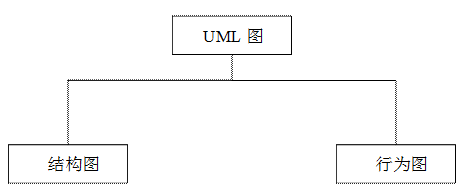
UML构造块——图的解释 UML中的图可分为两大类:结构图和行为图。结构图描绘系统中事物的组成及结构关系;行为图描绘系统中事物间的相互交互行为。下面是UML图的组成,如图23所示。(图是根据UML中存在的构造块进行说明的,视图是根据要具体解决的问题对系统进行说明。也就是说,要想完成某个视图,需要使用一个或者多个UML中的构造块,由事物构成的图) 图23 UML图的组成 1.结构图(静态结构图) 结构图又分为6种,如图24所示。 图6-24 结构图组成 (1)类图 类图是使用UML建模时最常用的图,它展示了系统中的静态事物、它们的结构以及它们之间的相互关系。这种图的典型用法是描述系统的逻辑设计和物理设计。 (2)构件图 构件图可以展示一组构件的组织和彼此间的依赖关系,它用于说明软件系统如何实现,以及软件系统内构件如何协同工作等。 (3)对象图 对象图可以展示系统中的一组对象,它是系统在某一时刻的快照,也可以说对象图是类图在某一时刻的快照。 (4)部署图 部署图可以展示物理系统运行时的架构,同时可以描述系统中的硬件架构和硬件上驻留的软件架构。 (5)组合结构图 组合结构图可以展示...

2019-09-30
2019.11.01-2019.11.31
文献阅读内容整理主题:群体智能与协同防御课题目标将群体智能与网络安全技术进行结合,实现局域网范围内的协同防御。 主要对象局域网内的计算机、工控设备、打印机等网络设备。 主要任务 能够从局域网内的不同设备采集数据。群智感知?分布式数据采集?显然主要任务是实现分布式数据采集。群智感知的对象是分布式网络中的智能个体-人。人后通过智能个体构成的分布式网络实现对整个社会的感知任务。然而在我们的目标当中,每个对象都是计算机,不需要激励机制,不需要设备对象感知社会。不过也存在这么一种情况。如果是分布式的群体智能的话,即没有中央控制的智能设备的话,智能个体之间的交互是否可以存在两种形式:请求响应,主动分发。通过这两种形式,实现局域网络内智能设备的沟通与同步,实现知识积累后的传递。综上所述,群智感知领域的论文可能不太适合,应该是分布式数据采集的能力。关于构想的模型,分布式数据采集,是否需要中央控制器。群体智能与协同防御是否是中央控制网络还是分布式控制网络。如果要实现分布式控制网络,每个个体可能都是一个能够独立完成任务的独立个体。所以相比中央控制的网络具有哪些优势?就像传统的360安全控制一样,有统...




