
rainbow_text
彩虹文本
该示例演示如何将多个文本对象串在一起。
过去
在2012年2月的matplotlib-users列表中,GökhanSever提出以下问题:
matplotlib中有一种可以部分指定字符串的颜色的方法吗?
例子:
1 | plt.ylabel("Today is cloudy.") How can I show "today" as red, "is" as green and "cloudy." as blue? |
感谢。
Paul Ivanov 的回答:

1 | import matplotlib.pyplot as plt |
下载这个示例
本博客所有文章除特别声明外,均采用 CC BY-NC-SA 4.0 许可协议。转载请注明来源 Estom的博客!
相关推荐

2021-03-08
4. 静态建模
静态建模 描述了被建模系统的静态结构,不随时间变化而变化。 问题域静态建模:分析阶段对系统的主要概念进行建模。 目录 类间关系 约束 UML表示 系统上下文的静态建模 外部类静态建模 实体类的静态建模 1 类间关系1.1 关联关系 定义了两个类之间静态的、结构化的关系。 关联称为链接。类之间有链接关系的对象之间才会有链接。关联的方向取决于动作的方向。 自反关联(一元关联):一个类的一个对象和这个类的另一个对象之间的关联。 三元关联:三个类间的关联(两个类之间的关联关系也转化为一个类) 关联类:对两个或多个类之间的关系进行建模的类。 关联的多重性:一对一关联、一对多关联、规定数值的关联、可选关联(0…1表示可能存在)、多对多关联。 1.2 整体和部分的关系(组合聚合关系) 关系强弱:组合>聚合>关联 组合涉及整体和部分之间的物理关系。 聚合概念上的整体和部分关系,可以分开可以合并。 1.3 泛化特化关系 相同属性抽象为泛化类 不同属性表示了特化的性质 2 约束对关联、对象属性进行约束。 3 问题域静态建模——上下文类 通过分析用例模型来对问题域建模...

2022-04-18
08 函数对象
函数与 Function 对象函数是这样的一段 JavaScript 代码,它只定义一次,但可能被执行或调用多次。 Function 类型是 JavaScript 提供的引用类型之一,通过 Function 类型创建 Function 对象。 在 JavaScript 中,函数也是以对象的形式存在的。每个函数都是一个 Function 对象。 函数名,本质就是一个变量名,是指向某个 Function 对象的引用。 构造函数在 JavaScript 中,函数除了可以通过函数定义语句或字面量表达式两种方式定义之外,还可以通过 Function 类型进行定义: 12345var add = new Function( "num1", "num2", "var sum = num1+num2; return sum;"); 值得注意的是: 通过 Function 类型定义函数的效率远不如通过函数定义语句或字面量表达式两种方式定义。 目前,定义函数具有三种方式,这三种方式之间存在一定差别: 定义方式 执行 效率 ...
2021-03-09
5.3 Manager(管理器)
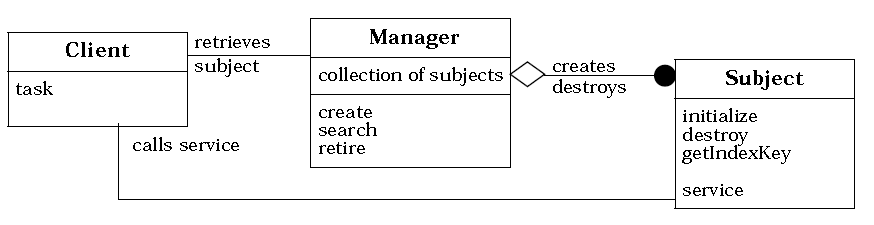
索引 意图 结构 参与者 适用性 效果 实现 实现方式(一):Manager 模式的示例实现。 意图 将对一个类的所有对象的管理封装到一个单独的管理器类中。 这使得管理职责的变化独立于类本身,并且管理器还可以为不同的类进行重用。 Encapsulates management of a class’s objects into a separate manager object. This allows variation of management functionality independent of the class andthe manager’s reuse for different classes. 结构 参与者 Subject 领域对象。 提供 Client 需要的领域服务。 Manager Manager 类是唯一负责创建和销毁 Subject 对象的类。它负责跟踪和管理 Subject对象。 典型的管理职责包括根据指定的 Key 搜索 Subject 对象。 因为 Subject 对 Manager 无引用,所以 Man...

2022-04-18
15 继承
原型链构造函数或构造器具有 prototype 属性,对象具有 __proto__ 属性,这就是之前学习的原型。 如果构造函数或对象 A ,A 的原型指向构造函数或对象 B,B 的原型再指向构造函数或对象 C,以此类推,最终的构造函数或对象的原型指向 Object 的原型。由此形成一条链状结构,被称之为原型链。 按照上述的描述,在 B 中定义的属性或方法,可以直接在 A 中使用并不需要定义。这就是继承,它允许每个对象来访问其原型链上的任何属性或方法。 原型链是 ECMAScript 标准中指定的默认实现继承的方式。 原型链的示意结构图如下: 原型链实现继承1234567891011121314function A(){ this.name = "a"; this.toString = function(){return this.name};}function B(){ this.name = "b";}function C(){ this.name = "c...

2020-09-24
8数据类型
datetime有效的类型 class datetime.date一个理想化的简单型日期,它假设当今的公历在过去和未来永远有效。 属性: year, month, and day。 class datetime.time一个独立于任何特定日期的理想化时间,它假设每一天都恰好等于 246060 秒。 (这里没有“闰秒”的概念。) 包含属性: hour, minute, second, microsecond 和 tzinfo。 class datetime.datetime日期和时间的结合。属性:year, month, day, hour, minute, second, microsecond, and tzinfo. class datetime.timedelta表示两个 date 对象或者 time 对象,或者 datetime 对象之间的时间间隔,精确到微秒。 class datetime.tzinfo一个描述时区信息对象的抽象基类。 用来给 datetime 和 time 类提供自定义的时间调整概念(例如处理时区和/或夏令时)。 class datetime...
2020-09-10
11 原型链
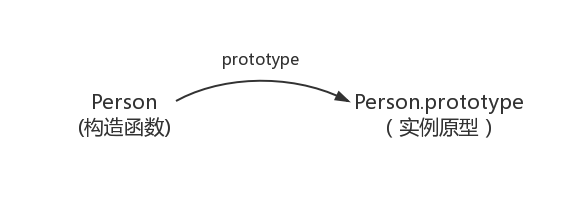
原型与继承参考文献 1 函数与对象的表面关系 函数是函数,对象是对象。 函数本身也是特殊对象,typeof 返回function。函数返回值可以是对象。 对象可以包含函数属性。typeof 返回object 函数可以作为对象的模板,称为对象构造器,typeof返回值,返回object。常见的内置类型构造器,首字母大写,通过new关键字,返回新的对象。new Array();new Function(); 变量可以指向函数,也可以指向对象。 函数的定义方法 function(){}匿名函数;或者function name(){} 对象的定义方法 new Creator();或者{}。从对象构造器中创建对象,或者直接创建对象。通过new创建的对象,proto指向Creator()对象构造器。通过{}创建的对象,proto指向Object()对象构造起,会形成,proto链。 2 原型函数原型 原型的概念:每一个javascript对象(除null外)创建的时候,就会与之关联另一个对象,这个对象就是我们所说的原型,每一个对象都会从原型中“继承”属性。 12345678functio...




