
embedding_in_wx2_sgskip
嵌入Wx2
如何在具有新工具栏的应用程序中使用wxagg的示例
1 | from matplotlib.backends.backend_wxagg import FigureCanvasWxAgg as FigureCanvas |
下载这个示例
本博客所有文章除特别声明外,均采用 CC BY-NC-SA 4.0 许可协议。转载请注明来源 Estom的博客!
相关推荐

2020-09-26
fonts_demo
字体演示(面向对象的风格)使用setter设置字体属性。 请参见字体演示(Kwargs),以使用kwargs实现相同的效果。 123456789101112131415161718192021222324252627282930313233343536373839404142434445464748495051525354555657585960616263646566676869707172737475767778798081828384858687888990919293949596979899100101102103104105106from matplotlib.font_manager import FontPropertiesimport matplotlib.pyplot as pltplt.subplot(111, facecolor='w')font0 = FontProperties()alignment = {'horizontalalignment': 'center', '...
2021-03-09
3.3 组合
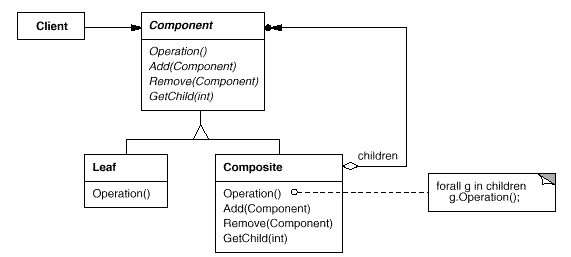
组合模式意图 将对象组合成树形结构以表示 “部分-整体” 的层次结构。 Composite 使得用户对于单个对象和组合对象的使用具有一致性。 Compose objects into tree structures to represent part-whole hierarchies. Composite lets clients treat individual objects and compositions of objectsuniformly. 结构 典型的 Composite 对象结构: 参与者 Component 为组合中的对象声明接口。 在适当的情况下,实现所有类共有接口的缺省行为 声明一个接口用于访问和管理 Component 的子组件。 在递归结构中定义一个接口,用于访问一个父部件,并在合适的情况下实现它。 Leaf 在组合中表示叶节点对象,叶节点没有子节点。 在组合中定义图元对象的行为。 Composite 定义有子部件的那些部件的行为。 在 Composite 接口中实现与子部件有关的操作。 Client 通过 Comp...

2020-09-26
subplots_demo
子图演示大全说明 plt.subplots() 使用的示例。 此函数只需一次调用即可创建地物和子图网格,同时对各个图的创建方式提供合理的控制。要对子打印创建进行非常精细的调整,仍然可以直接在新地物上使用 add_subplot()。 12345678import matplotlib.pyplot as pltimport numpy as np# Simple data to display in various formsx = np.linspace(0, 2 * np.pi, 400)y = np.sin(x ** 2)plt.close('all') 只有一个图形和一个子图 123f, ax = plt.subplots()ax.plot(x, y)ax.set_title('Simple plot') 两个子图,轴数组是一维的。 1234f, axarr = plt.subplots(2, sharex=True)f.suptitle('Sharing X axis')axarr[0].plot(x, ...

2022-11-01
2 CronTrigger
3 CronTrigger类Quartz有两大触发器,除了上面使用的SimpleTrigger外,就是CronTrigger。CronTrigger能够提供复杂的触发器表达式的支持。CronTrigger是基于Unix Cron守护进程,它是一个调度程序,支持简单而强大的触发器语法。 使用CronTrigger主要的是要掌握Cron表达式。Cron表达式包含6个必要组件和一个可选组件,如下表所示。 位置 含义 允许的特殊字符 1 秒(0~59) , - * / 2 分(0~59) , - * / 3 小时(0~24) , - * / 4 日期(1~31) , - * / ? L W C 5 月(JANDEC或112) , - * / 6 星期(SUNSAT或17) , -&...

2021-09-07
9.3-chinese
9.3 本章总结在本章中,我们了解各种“高级”线程管理技术:线程池和中断线程。也了解了如何使用本地任务队列,使用任务窃取的方式减小同步开销,提高线程池的吞吐量;等待子任务完成的同时执行队列中其他任务,从而来避免死锁。 也了解了使用线程去中断另一个处理线程的各种方式,比如:使用特定的断点和函数执行中断,要不就是使用某种方法,对阻塞等待进行中断。

2022-12-04
19-Vuex
# 1. 什么是Vuex **Vuex**是一个专为**Vue.js**应用程序开发的状态管理模式。它采用集中式存储管理应用的所有组件的状态,并以相应的规则保证状态以一种可预测的方式发生变化。 其实最简单理解为,在我们写Vue组件中,一个页面多个组件之间想要通信数据,那你可以使用**Vuex** - Vuex 是一个专为 Vue.js 应用程序开发的状态管理模式 - Vuex状态管理 === 管理组件数据流动 === 全局数据管理 - Vue的全局数据池,在这里它存放着大量的复用或者公有的数据,然后可以分发给组件 - Vue双向数据绑定的MV框架,数据驱动(区别节点驱动),模块化和组件化,所以管理各组件和模块之间数据的流向至关重要 - Vuex是一个前端非持久化的数据库中心,Vuex其实是Vue的重要选配,一般小型不怎么用,大型项目运用比较多,所以页面刷新,Vuex数据池会重置 - > 路由-》管理的是组件流动 > Vuex-》管理的是数据流动 没有`Vuex`之前,组件数据来源 - ajax请求后端 - 组件自身定义默认数据 - 继承其他组件的数据 - (从v...




