
toolmanager_sgskip
工具管理
此示例演示如何:
- 修改工具栏。
- 创建工具。
- 添加工具。
- 删除工具
可以使用 matplotlib.backend_managers.ToolManager
1 | import matplotlib.pyplot as plt |
下载这个示例
本博客所有文章除特别声明外,均采用 CC BY-NC-SA 4.0 许可协议。转载请注明来源 Estom的博客!
相关推荐

2019-09-29
04latex文档提纲
latex文档提纲构建文章提纲\section{}\subseciton{}\subsubsection{} ctex文章结构 使用ctex宏包不改变section结构 使用ctexarticle文档类,section居中,可以通过\ctexset{}命令修改ctex中关于section的基础设置。 能够使用\ctexset{}命令设置大量关于section的细节,包括编号形式与位置。 产生目录\tableofcontents 换行方法 插入空行 \ \par命令 养成内容与格式分离的习惯。
2021-09-07
5.2-chinese
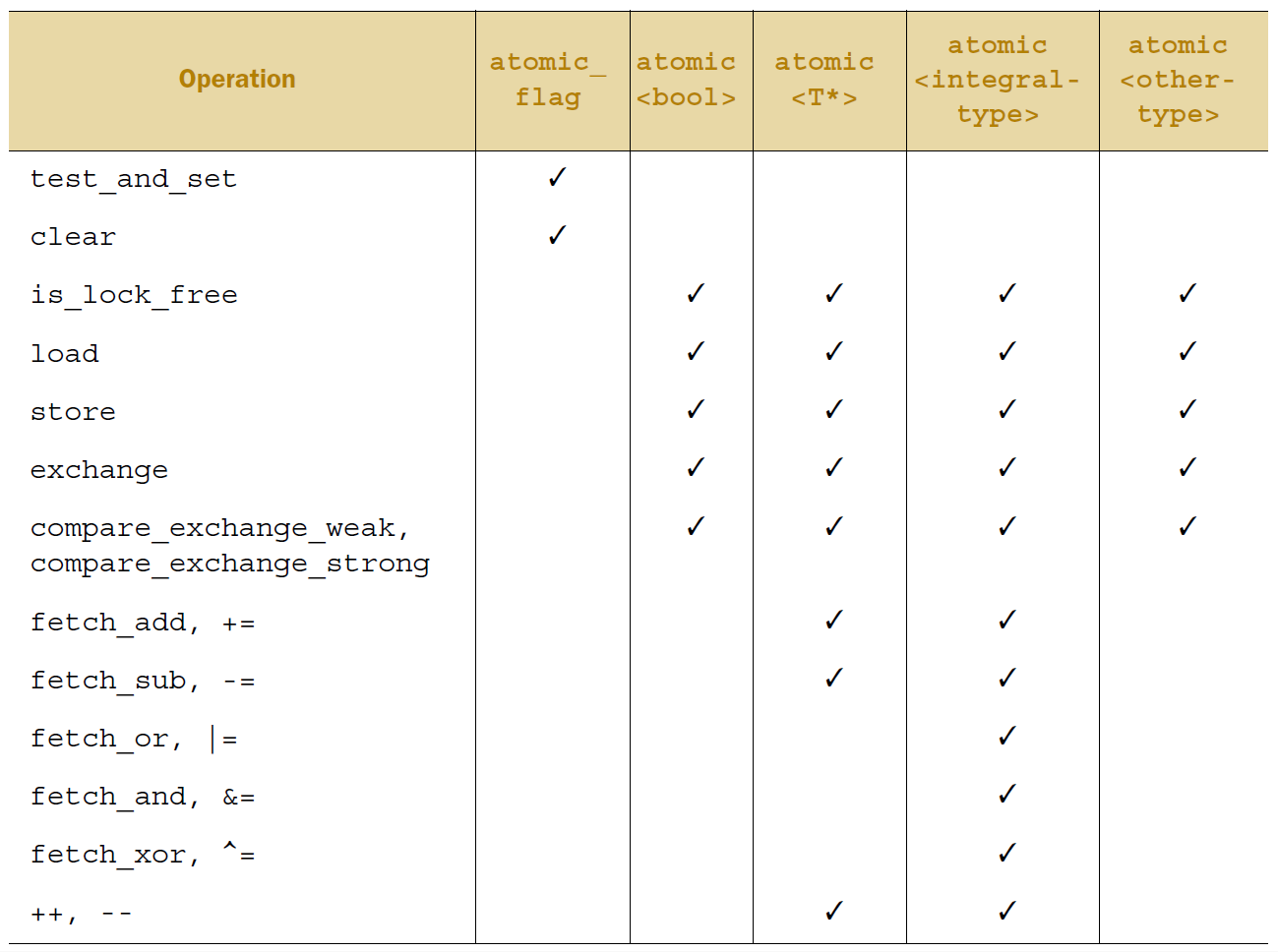
5.2 C++中的原子操作和原子类型原子操作 是个不可分割的操作。在系统的所有线程中,你是不可能观察到原子操作完成了一半这种情况的;它要么就是做了,要么就是没做,只有这两种可能。如果从对象读取值的加载操作是 原子 的,而且对这个对象的所有修改操作也是 原子 的,那么加载操作得到的值要么是对象的初始值,要么是某次修改操作存入的值。 另一方面,非原子操作可能会被另一个线程观察到只完成一半。如果这个操作是一个存储操作,那么其他线程看到的值,可能既不是存储前的值,也不是存储的值,而是别的什么值。如果这个非原子操作是一个加载操作,它可能先取到对象的一部分,然后值被另一个线程修改,然后它再取到剩余的部分,所以它取到的既不是第一个值,也不是第二个值,而是两个值的某种组合。正如第三章所讲的,这一下成了一个容易出问题的竞争冒险,但在这个层面上它可能就构成了 数据竞争 (见5.1节),就成了未定义行为。 在C++中,多数时候你需要一个原子类型来得到原子的操作,我们来看一下这些类型。 5.2.1 标准原子类型标准 原子类型 定义在头文件<atomic>中。这些类型上的所有操作都是原子的,在...

2022-11-07
03 maven与Idea
Idea的使用1 创建工程 创建maven工程。可以选择archetype创建模板工程,也可以不选,创建标准工程。 配置项目。基本配置包括groupId、artifactId、version maven的配置。在setting/preference自定义maven的位置,加载maven的仓库位置,而不是使用Idea集成的maven。可以通过maven工具窗口。 创建Java模块工程。在父工程中自动添加modules和package 2 侧边栏使用 扳手:配置maven 打开关闭目录 M:表示执行maven命令 展示依赖关系图 查看依赖树 3 工程导入导入整个工程IDEA直接打开目录就能识别。含有parent-pom的目录 导入单个模块project-structures Import module导入基本组件。 project-structures Import facets导入Web组件 4 生命周期提高构件过程的自动化程度。

2020-09-26
ellipse_demo
椭圆演示绘制多个椭圆。此处绘制单个椭圆。将其与Ellipse集合示例进行比较。 12345678910111213141516171819202122import matplotlib.pyplot as pltimport numpy as npfrom matplotlib.patches import EllipseNUM = 250ells = [Ellipse(xy=np.random.rand(2) * 10, width=np.random.rand(), height=np.random.rand(), angle=np.random.rand() * 360) for i in range(NUM)]fig, ax = plt.subplots(subplot_kw={'aspect': 'equal'})for e in ells: ax.add_artist(e) e.set_clip_box(ax.bbox) ...

2021-12-24
php
phpPHP语言的命令行接口 补充说明php命令 是流行的Web开发语言PHP的命令行接口,可以使用PHP语言开发基于命令行的系统管理脚本程序。 语法1php(选项)(参数) 选项12-a:进入交互模式;-c:指定“php.ini”的搜索路径。 参数文件:要执行的php脚本。
2025-09-03
02 Java内存区域与内存溢出
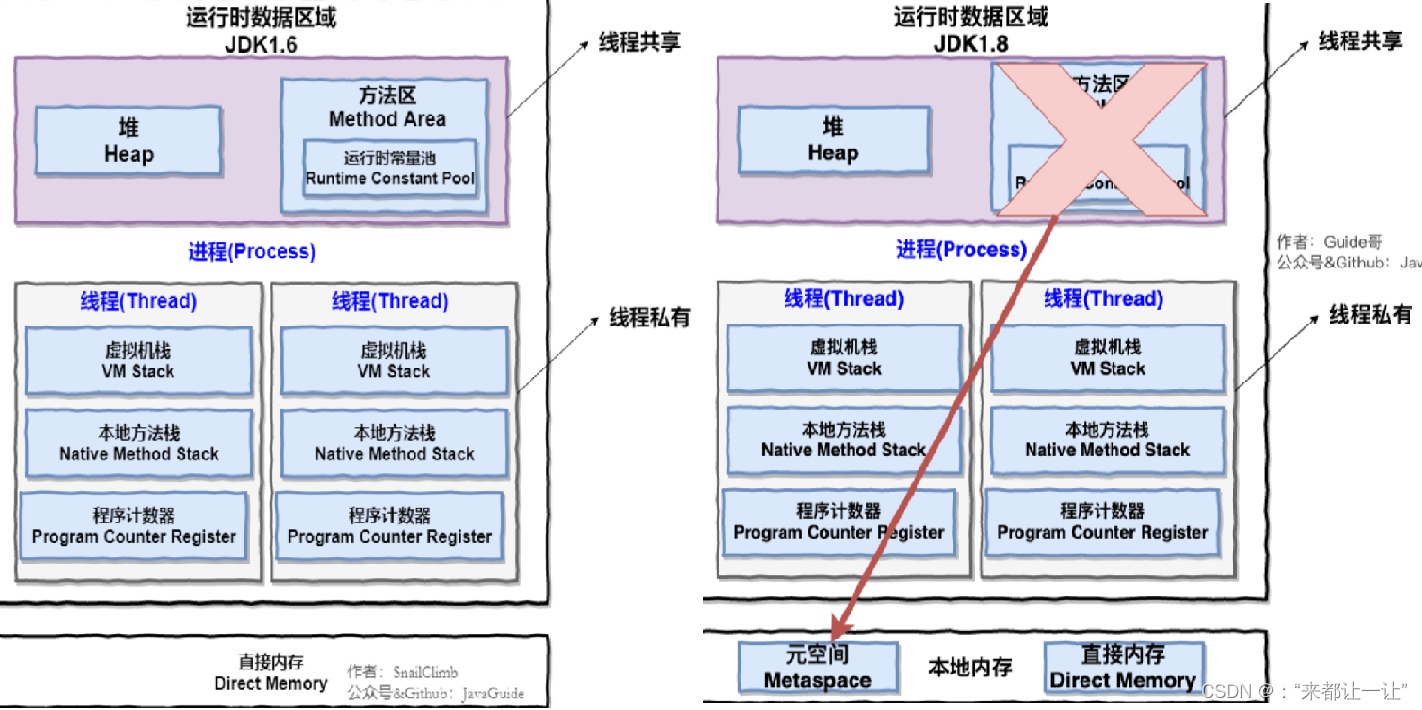
2 Java内存区域与内存溢出异常2.1 概述虚拟机提供的最大的能力:自动内存管理。不再需要用户为每一个操作去写配对的delete、free代码,不需要手动管理内存的申请和释放,不容易出现内存泄漏的问题。这也符合并奠定了Java的操作哲学,通过各种各样的运行时接管一些常规的传统语言的操作。 2.2 运行时内存区域 程序计数器:当前线程所执行的字节码的行号指示器。多线程通过线程切换、分配处理器执行,每条线程都需要一个独立的程序计数器,各线程之间计数器互不影响、独立存储,是线程私有的内存。 Java虚拟机栈:Java方法执行的内存模型。每个方法执行的时候,创建一个栈帧用于存储局部变量表、操作数栈、动态链接、方法出口等信息。线程私有的内存。局部变量表存放了编译器可知的各种Java虚拟机基本变量类型、对象引用、返回地址类型,局部变量表所需要的空间是在编译期间分配完成的,运行过程中,当进入一个方法时,这个方法需要再栈帧中分配多大的局部变量空间是完全确定的。 本地方法栈:本地方法的栈帧。也是线程私有的内存。 堆:用于存放对象实例。被所有线程共享的一块内存区域,是垃圾收集器管理的内存区域。可...



