
rectangle_selector
矩形选择器
在某处鼠标点击,将鼠标移动到某个目的地,然后释放按钮。 此类提供单击和释放事件,并从点击点到实际鼠标位置(在相同轴内)绘制一条线或一个框,直到释放按钮。 在方法’self.ignore()’中,检查来自eventpress和eventrelease的按钮是否相同。

输出:
1 | click --> release |
1 | from matplotlib.widgets import RectangleSelector |
下载这个示例
本博客所有文章除特别声明外,均采用 CC BY-NC-SA 4.0 许可协议。转载请注明来源 Estom的博客!
相关推荐

2020-09-26
pick_event_demo
选择事件演示您可以通过设置艺术家的“选择器”属性来启用拾取(例如,matplotlib Line2D,Text,Patch,Polygon,AxesImage等…) 选择器属性有多种含义 None - 此艺术家对象的选择功能已停用(默认) boolean - 如果为True,则启用拾取,如果鼠标事件在艺术家上方,艺术家将触发拾取事件 float - 如果选择器是一个数字,则它被解释为以点为单位的epsilon容差,如果事件的数据在鼠标事件的epsilon内,则艺术家将触发事件。 对于某些艺术家(如线条和补丁集合),艺术家可能会为生成的挑选事件提供其他数据,例如,挑选事件的epsilon中的数据索引 function - 如果选择器是可调用的,则它是用户提供的函数,用于确定艺术家是否被鼠标事件命中。 hit, props = picker(artist, mouseevent) 确定命中测试。 如果鼠标事件在艺术家上方,则返回hit = True,props是要添加到PickEvent属性的属性字典 通过设置“选取器”属性启用艺术家进行拾取后...

2020-09-26
textbox
文本框允许使用Textbox小部件输入文本。 您可以使用“文本框”小部件让用户提供需要显示的任何文本,包括公式。 您可以使用提交按钮创建具有给定输入的绘图。 12345678910111213141516171819202122import numpy as npimport matplotlib.pyplot as pltfrom matplotlib.widgets import TextBoxfig, ax = plt.subplots()plt.subplots_adjust(bottom=0.2)t = np.arange(-2.0, 2.0, 0.001)s = t ** 2initial_text = "t ** 2"l, = plt.plot(t, s, lw=2)def submit(text): ydata = eval(text) l.set_ydata(ydata) ax.set_ylim(np.min(ydata), np.max(ydata)) plt.draw()axbox = plt.axes([0.1...
2023-11-26
Java核心思想
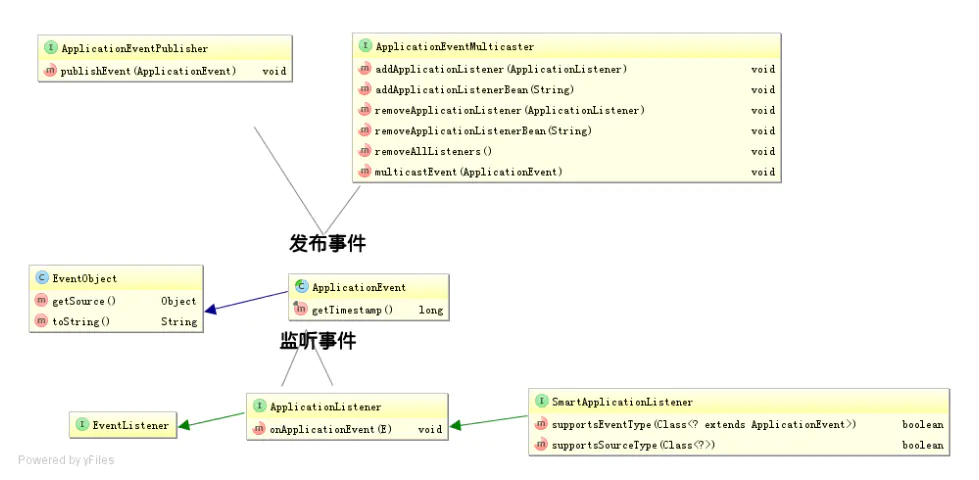
1 观察者模式简介先是一种对象间的一对多的关系;最简单的如交通信号灯,信号灯是目标(一方),行人注视着信号灯(多方)。当目标发送改变(发布),观察者(订阅者)就可以接收到改变。 观察者如何处理(如行人如何走,是快走/慢走/不走,目标不会管的), 目标无需干涉;所以就松散耦合了它们之间的关系。 别名:观察者模式、事件监听机制、事件通知机制、回调机制 关键概念 可观察对象、观察者。(观察者模式) 事件、响应。(事件驱动、事件监听机制、响应式编程) 使用场景观察着模式在不同场景下的实现。 java语言中的回调机制 设计模式中的观察者模式 jdk中的observable和observer 在操作系统中就是IO多路复用的一种策略 在socket网络编程、IO编程中(netty、springWebFlux、sofarpc)就是Reactor模式 Spring的事件驱动模型 在UI框架中就是Listener,事件监听机制和响应机制 在web网站开发中,被称为响应式编程。 消息队列中的事件通知机制,消息队列中通过Event的事件传递变化。 2 服务发现机制简介观察者模式...

2021-03-30
附录6 中断
中断1 中断定义广义和狭义 广义:程序执行过程中,遇到急需处理的事件时,暂时中止CPU上现行程序的运行,转去执行相应的事件处理程序,待处理完成后再返回原程序被中断处或调度其他程序执行的过程。 操作系统是“中断驱动”的,中断是激活操作系统的唯一方式。 狭义:处理器之外的中断事件,与当前运行指令无关的中断事件。I/O中断、时钟中断、外部信号中断。 2 中断分类外中断 由 CPU 执行指令以外的事件引起,如 I/O 完成中断,表示设备输入/输出处理已经完成,处理器能够发送下一个输入/输出请求。此外还有时钟中断、控制台中断等。 内中断 异常中断。由 CPU 执行指令的内部事件引起,如非法操作码、地址越界、算术溢出等。 陷入中断。在用户程序中使用系统调用。 3 中断事件中断来源 由处理器、内存储器、总线等硬件故障引起 由处理器执行机器指令引起。 除数为0,操作数溢出等算术异常:简单处理,报告用户;由用户编写中断续元程序处理 非法程序、用户态使用特权指令、地址越界、非法存取等指令异常:终止程序 终止进程指令:终止进程 虚拟地址异常:调整内存后...

2021-12-24
pico
pico功能强大全屏幕的文本编辑器 补充说明pico命令 是功能强大全屏幕的文本编辑器。pico的操作简单,提供了丰富的快捷键。常用的快捷键如下: 123456789101112Ctrl+G:获得pico的帮助信息;Ctrl+O:保存文件内容,如果是新文件,需要输入文件名;Ctrl+R:在当前光标位置插入一个指定的文本文件内容;Ctrl+Y:向前翻页;Ctrl+V:向后翻页;Ctrl+w:对文件进行搜索;Ctrl+K:剪切当前文件行到粘贴缓冲区;Ctrl+U:粘贴缓冲区中的内容到当前光标所在位置;Ctrl+C:显示当前光标位置;Ctrl+T:调用拼写检查功能,对文档进行拼写检查;Ctrl+J:段落重排;Ctrl+X:退出,当文件内容发生改变时,提供是否保存修改。 语法1pico(选项)(参数) 选项1234567891011121314151617181920-b:开启置换的功能;-d:开启删除的功能;-e:使用完整的文件名称;-f:支持键盘上F1、F2...功能键;-g:显示光标;-h:在线帮助;-j:开启切换的功能;-k:预设pico在使用剪下命令时,会把光标所在的列的内...

2021-09-02
gRPC服务定义
grpc可以定义四类服务,服务端实现约定的接口并提供服务,客户端按照约定调用方法请求服务 单项 RPC即客户端发送一个请求给服务端,从服务端获取一个应答,就像一次普通的函数调用。 12rpc SayHello(HelloReqeust) returns (HelloResponse) {} 服务端流式 RPC即客户端发送一个请求给服务端,可获取一个数据流用来读取一系列消息。客户端从返回的数据流里一直读取直到没有更多消息为止。 12rpc LotsOfReplies(HelloRequest) returns (stream HelloResponse){} 客户端流式 RPC即客户端用提供的一个数据流写入并发送一系列消息给服务端。一旦客户端完成消息写入,就等待服务端读取这些消息并返回应答。 12rpc LotsOfGreetings(stream HelloRequest) returns (HelloResponse) {} 双向流式 RPC即两边都可以分别通过一个读写数据流来发送一系列消息。这两个数据流操作是相...




