命令模式 别名
意图
将一个请求封装为一个对象,从而使你可用不同的请求对客户进行参数化;对请求排队或记录请求日志,以及支持可撤销的操作。
Encapsulate a request as an object, thereby letting you parameterize clients
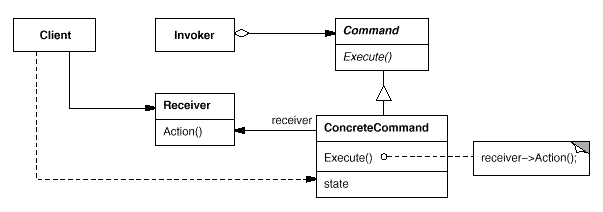
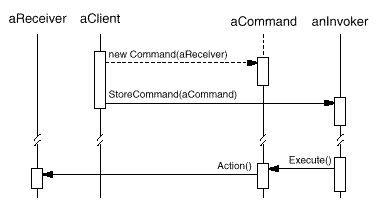
结构
参与者
Command
ConcreteCommand
将一个接收者对象绑定于一个动作。
调用接收者相应的操作,以实现 Execute。
Client
创建一个具体 Command 对象并设定它的接收者。
Invoker
Receiver
知道如何实施与执行一个请求相关的操作。任何类都可能作为一个接收者。
适用性
在以下情况下可以使用 Command 模式:
Command
在不同的时刻指定、排列和执行请求。Command
支持取消操作。需要定义 Unexecute 操作来取消 Execute 操作调用的效果。
支持修改日志,这样当系统崩溃时,这些修改可以被重做一遍。
用构建在原语操作上的高层操作构造一个系统。例如构建事务(Transaction)系统。
效果
Command 模式将调用操作的对象与知道如何实现该操作的对象解耦。
Command 是 first-class 对象。它们可像其他的对象一样被操纵和扩展。
可以将多个 Command 装配成一个复合 Command。
增加新的 Command 很容易,因为无需改变已有的类
相关模式
Composite 模式可被用来实现 MacroCommand。
Memento 模式可用来保持某个状态,Command 用这一状态来取消它的效果。
可以使用 Prototype 来拷贝 Command 对象。
Implementation 设计一个遥控器,可以控制电灯开关。
1
2
3
public interface Command { void execute () ; }
1
2
3
4
5
6
7
8
9
10
11
12
public class LightOnCommand implements Command { Light light; public LightOnCommand (Light light) { this .light = light; } @Override public void execute () { light.on(); } }
1
2
3
4
5
6
7
8
9
10
11
12
public class LightOffCommand implements Command { Light light; public LightOffCommand (Light light) { this .light = light; } @Override public void execute () { light.off(); } }
1
2
3
4
5
6
7
8
9
10
public class Light { public void on () { System.out.println("Light is on!" ); } public void off () { System.out.println("Light is off!" ); } }
1 2 3 4 5 6 7 8 9 10 11 12 13 14 15 16 17 18 19 20 21 22 23 24 25 26 27 28 29 public class Invoker { private Command[] onCommands; private Command[] offCommands; private final int slotNum = 7 ; public Invoker () { this .onCommands = new Command [slotNum]; this .offCommands = new Command [slotNum]; } public void setOnCommand (Command command, int slot) { onCommands[slot] = command; } public void setOffCommand (Command command, int slot) { offCommands[slot] = command; } public void onButtonWasPushed (int slot) { onCommands[slot].execute(); } public void offButtonWasPushed (int slot) { offCommands[slot].execute(); } }
1
2
3
4
5
6
7
8
9
10
11
12
public class Client { public static void main (String[] args) { Invoker invoker = new Invoker (); Light light = new Light (); Command lightOnCommand = new LightOnCommand (light); Command lightOffCommand = new LightOffCommand (light); invoker.setOnCommand(lightOnCommand, 0 ); invoker.setOffCommand(lightOffCommand, 0 ); invoker.onButtonWasPushed(0 ); invoker.offButtonWasPushed(0 ); } }
JDK