
02 创建项目
1 创建项目
1.1. maven设置
- 配置maven的Aliyun镜像和jdk版本
1 | <mirrors> |
1.2. 创建maven工程
1 | mvn archetype:generate |
1.3. 引入依赖
1 | <parent> |
1.4. 创建主程序
1 | /** |
1.5. 编写业务逻辑
1 |
|
1.6. 测试
直接运行main方法
1.7. 配置
application.properties
1 | server.port=8888 |
1.8. 简化部署
把项目打成jar包,直接在服务器运行。
1 | <build> |
2 工程结构
2.1. 推荐工程结构
1 | com |
- root package:com.example.myproject,所有的类和其他package都在root package之下。
- 应用主类:Application.java,该类直接位于root package下。通常我们会在应用主类中做一些框架配置扫描等配置,我们放在root package下可以帮助程序减少手工配置来加载到我们希望被Spring加载的内容
- com.example.myproject.domain包:用于定义实体映射关系与数据访问相关的接口和实现
- com.example.myproject.service包:用于编写业务逻辑相关的接口与实现
- com.example.myproject.web:用于编写Web层相关的实现,比如:Spring MVC的Controller等
Spring Boot的应用主类会自动扫描root package以及所有子包下的所有类来进行初始化。
2.2. 非典型结构下的初始化
- 使用@ComponentScan注解指定具体的加载包
1 |
|
- 使用@Bean注解来初始化。在主类中进行初始化。
1 |
|
3 两大特性——依赖管理
3.1. 依赖管理的原理
通过父项目进行依赖管理。通过starter进行依赖导入。
1 | <parent> |
mypom.xml
parent – spring-boot-starter-parent
parent – spring-boot-dependencies
几乎声明了所有的版本,查看Spring-boot-dependencies中的版本。可以自定义properties标签,修改版本号。
stater场景启动器。自动引入相关的所有依赖。可以自定义场景启动器,所有场景启动器最基本的以来。spring-boot-starter。引入依赖一部分可以不写版本号。引入非版本仲裁的版本号,必须要写。
修改默认的版本号,就近优先原则。
- 查看parent中定义了版本的key,在子项目中覆盖该key,即可修改该版本。
3.2. spring-boot-starter-web的依赖树
(spring-boot-starter)-web
- spring-boot相关的依赖
- ()+logging依赖
- ()+jason依赖
- ()+tomcat依赖
- web/webmvc相关的依赖
新快捷键
1 | cmd+B 声明和引用相互跳转 |
- 依赖树
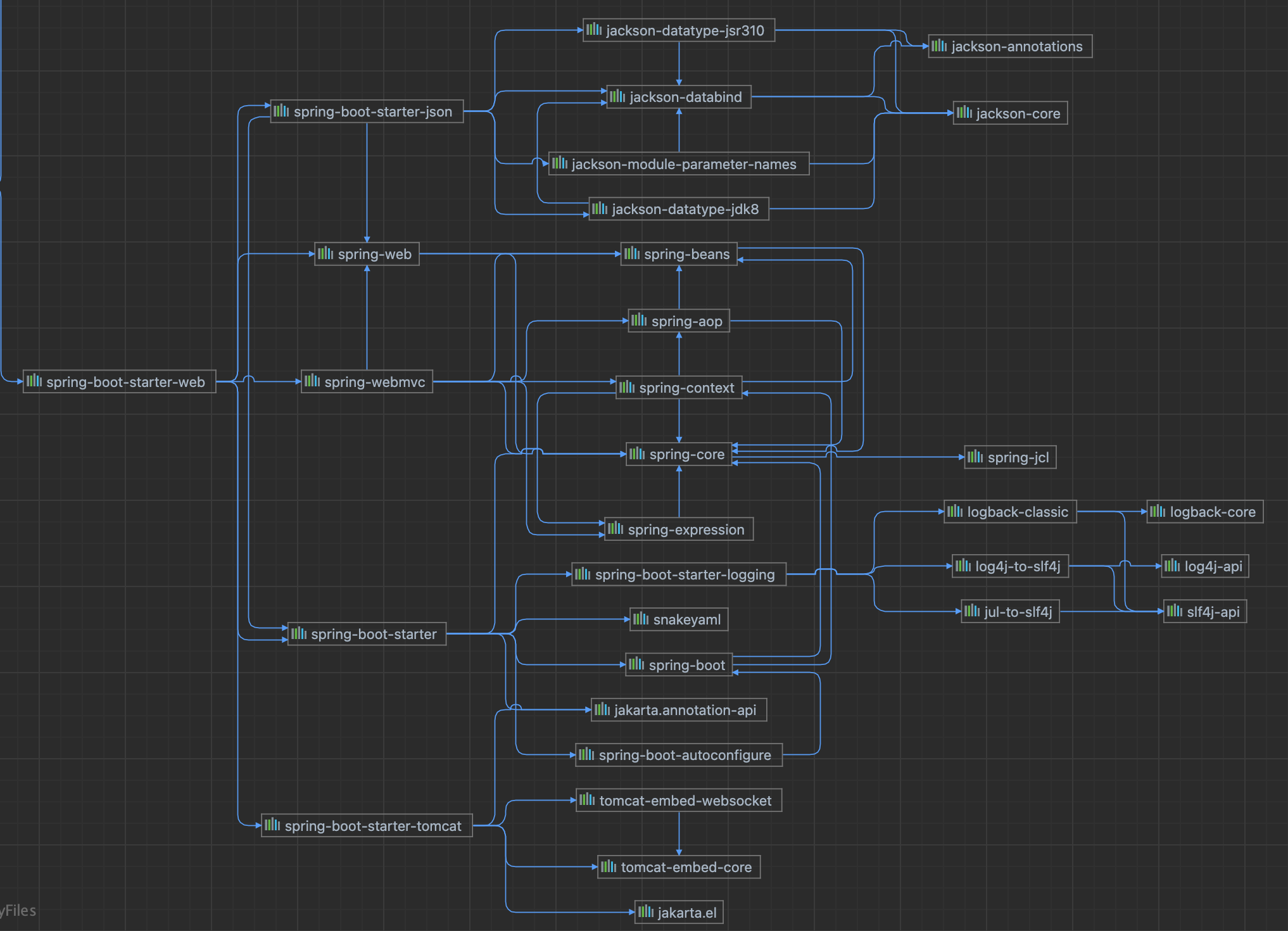
1 | [INFO] \- org.springframework.boot:spring-boot-starter-web:jar:2.3.4.RELEASE:compile |
4. 4 两大特性——自动配置
4.1. 自动配置的体现
- 自动配好了SpringMVC
- 引入了SpringMVC全套组件
- 自动配好了SpringMVC常用功能。字符编码问题、多文件上传问题
- 默认程序结构
- 主程序所在包及其所有子包里的文件和组件都能被扫描到。无需配置包扫描
- 可以修改SpringbootApplication注解参数中的扫描路径。或者ComponentScan注解。
- .properties中的文件是绑定到具体的Java类的。这些类会在容器中创建指定的对象。
- 按需加载所有的自动配置,自动配置都在spring-boot-autoconfigure包中
4.2. @ConfigurationProperties
@ConfigurationProperties是springboot提供读取配置文件的一个注解。
它是实现了BeanPostProcessor接口,在bean被实例化后,会调用后置处理,递归的查找属性,通过反射注入值,对大多数属性而言强制需提供其setter和getter方法。
本博客所有文章除特别声明外,均采用 CC BY-NC-SA 4.0 许可协议。转载请注明来源 Estom的博客!
相关推荐

2021-12-24
pfctl
pfctlPF防火墙的配置命令 补充说明pfctl命令 是PF防火墙的配置命令,PF防火墙( 全称:Packet Filter )是UNIX LIKE系统上进行TCP/ip流量过滤和网络地址转换的软件系统。PF同样也能提供TCP/IP流量的整形和控制,并且提供带宽控制和数据包优先集控制。PF最早是由Daniel Hartmeier开发的,现在的开发和维护由Daniel和openBSD小组的其他成员负责。 PF防火墙的功能很多,本站只列举一些基本配置。 激活要激活pf并且使它在启动时调用配置文件,编辑/etc/rc.conf文件,修改配置pf的一行: 1pf=yes 重启操作系统让配置生效。 也可以通过pfctl程序启动和停止pf: 12pfctl -epfctl -d 注意这仅仅是启动和关闭PF,实际它不会载入规则集,规则集要么在系统启动时载入,要在PF启动后通过命令单独载入。 配置系统引导到在rc脚本文件运行PF时PF从/etc/pf.conf文件载入配置规则。注意当/etc/pf.conf文件是默认配置文件,在系统调用rc脚本文件时,它仅仅是作为文本文...

2021-12-24
gunzip
gunzip用来解压缩文件 补充说明gunzip命令 用来解压缩文件。gunzip是个使用广泛的解压缩程序,它用于解开被gzip压缩过的文件,这些压缩文件预设最后的扩展名为.gz。事实上gunzip就是gzip的硬连接,因此不论是压缩或解压缩,都可通过gzip指令单独完成。 语法1gunzip(选项)(参数) 选项1234567891011121314-a或——ascii:使用ASCII文字模式;-c或--stdout或--to-stdout:把解压后的文件输出到标准输出设备;-f或-force:强行解开压缩文件,不理会文件名称或硬连接是否存在以及该文件是否为符号连接;-h或——help:在线帮助;-l或——list:列出压缩文件的相关信息;-L或——license:显示版本与版权信息;-n或--no-name:解压缩时,若压缩文件内含有原来的文件名称及时间戳记,则将其忽略不予处理;-N或——name:解压缩时,若压缩文件内含有原来的文件名称及时间戳记,则将其回存到解开的文件上;-q或——quiet:不显示警告信息;-r或——recursive:递归处理,将指定目录下的所有文件...

2021-12-24
find
find在指定目录下查找文件 补充说明find命令 用来在指定目录下查找文件。任何位于参数之前的字符串都将被视为欲查找的目录名。如果使用该命令时,不设置任何参数,则find命令将在当前目录下查找子目录与文件。并且将查找到的子目录和文件全部进行显示。 语法1find(选项)(参数) 选项内容 名称 -name 类型 -type f/d 时间 -mmin/mtime +- 空间 -size 权限 -perm 用户 -user/group 选项12345678910111213141516171819202122232425262728293031323334353637383940414243444546474849505152535455565758596061626364656667686970717273747576777879名称-name<范本样式>:指定字符串作为寻找文件或目录的范本样式;-regex<范本样式>:指定字符串作为寻找文件或目录的范本样式;类型-type<文件类型>:只寻找符合指定的文件类...
2023-09-09
08 Pod网络
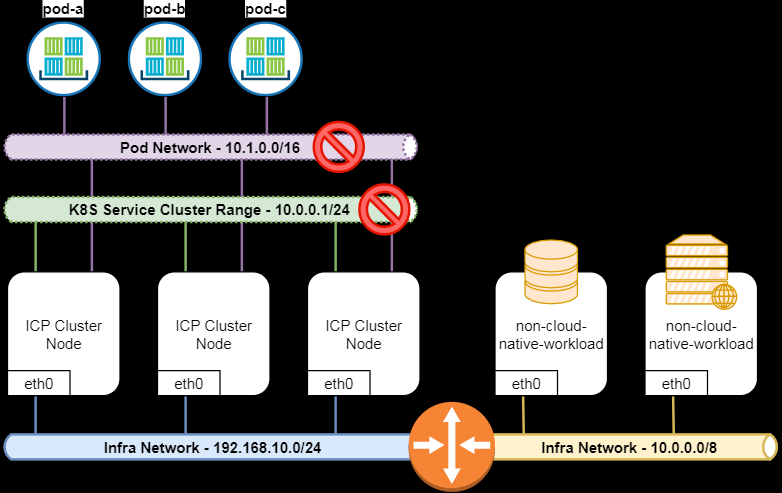
容器网络网络类型 Node Network: 外部网络接口。集群节点所在的网络,这个网络就是你的主机所在的网络,通常情况下是你的网络基础设施提供。如果node处于不同的网段,那么你需要保证路由可达。如上图中的 192.168.10.0/24和10.0.0.0/8这两个网络 Service Network:K8S服务网络,ipvs规则当中的网络,由特定组件提供路由和调度。 service_cluster_ip_range(如图,默认的配置是的10.0.0.1/24)。在上图中,扩充的节点(基础网络是10.0.0.0/8)和 服务网络(10.0.0.1/24)冲突,会造网络问题。 Pod Network: 节点当中pod的内部网络无法与外界通信。第三个网络是Pod的网络, K8s中一个Pod由多个容器组成,但是一个pod只有一个IP地址,Pod中所有的容器共享同一个IP。这个IP启动pod时从一个IP池中分配的, 叫做 pod CIDR, 或者叫network_cidr(如图,默认配置是10.1.0.0/16)。 可以在...

2019-09-28
综述说明
综述说明 弃用vscode文献整理。 说明定义文献综述是针对某一研究领域分析和描述前人已经做了哪些工作,进展到何程度,要求对国内外相关研究的动态、前沿性问题做出较详细的综述,并提供参考文献。作者一般不在其中发表个人见解和建议,也不做任何评论,只是客观概括地反映事实。 文献综述反映当前某一领域中某分支学科或重要专题的历史现状、最新进展、学术见解和建议,它往往能反映出有关问题的新动态、新趋势、新水平、新原理和新技术等等。 分类 叙述性综述:客观介绍原始文献和描述原始文献中各种观点和方法。不提出自己的评论。 评论性综述:对某一个专题进行综合性描述的基础上,进行横向对比、分析和评论。提出做着自己的观点和见解。 专题研究报告:对某一专题,提出发展对策、趋势预测。是一种现实性、政策性和针对性很强的情报分析研究工作。显著特点是预测性。 要点 综合性:纵向发展过程和横向分析对比 评述性:分析综合评价,反映作者观点。 先进性:不是写科学发展史,而是写最新的信息和科研方向。 步骤 选题 搜集文献 归纳整理分析 按规定格式形成论文 70% 为三年以内文献。 格式 题名:准确得体、简单精炼、醒目...

2021-12-24
named-checkzone
named-checkzone使用named-checkzone命令可以进行区域文件有效性检查和转换,必须指定区域名称和区域文件名称 补充说明named-checkzone命令 可以进行区域文件有效性检查和转换,必须指定区域名称和区域文件名称。 语法1named-checkzone [选项] [区域名] [区域文件名] 选项123-q 安静模式-d 启用调试-c <类别> 指定区域的类别。如果没指定就使用IN 例子对区域文件/var/named/192.168.0.rev进行有效性检查和转换。 123[root@localhost ~]# named-checkzone 0.168.192.in-addr.arpa /var/named/192.168.0.revzone0.168.192.in-addr.arpa/IN: loaded serial 1268360612OK 对区域文件/var/named/sh.com.hosts进行有效性检查和转换。 1234[root@localhost ~]# ...


