流程控制

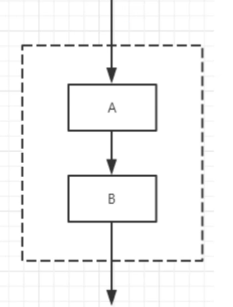
1 顺序结构

  1. java的基本结构

2 选择结构

if单选结构

1
2
3
4
5
6
7
8
9
10
public class Test {

public static void main(String args[]){
int x = 10;

if( x < 20 ){
System.out.print("这是 if 语句");
}
}
}

if-else结构

1
2
3
4
5
6
7
8
9
10
11
12
public class Test {

public static void main(String args[]){
int x = 30;

if( x < 20 ){
System.out.print("这是 if 语句");
}else{
System.out.print("这是 else 语句");
}
}
}

if-else嵌套

1
2
3
4
5
6
7
8
9
10
11
12
13
public class Test {

public static void main(String args[]){
int x = 30;
int y = 10;

if( x == 30 ){
if( y == 10 ){
System.out.print("X = 30 and Y = 10");
}
}
}
}

switch

  1. switch 语句中的变量类型可以是: byte、short、int 或者 char。

  2. 从 Java SE 7 开始,switch 支持字符串 String 类型了,同时 case 标签必须为字符串常量或字面量。模式使用String的hashCode作为匹配方法。

  3. switch 不支持 long、float、double,是因为 switch 的设计初衷是对那些只有少数几个值的类型进行等值判断,如果值过于复杂,那么还是用 if 比较合适。

  4. case穿透。如果case后没有break语句,则case条件成立后,会执行后续的所有代码,不会进行后续的判断。

1
2
3
4
5
6
7
8
9
10
11
12
13
14
15
16
17
18
19
20
21
switch(expression){
case value :
//语句
break; //可选
case value :
//语句
break; //可选
//你可以有任意数量的case语句
default : //可选
//语句
}

String s = "a";
switch (s) {
case "a":
System.out.println("aaa");
break;
case "b":
System.out.println("bbb");
break;
}

3 循环结构

while

1
2
3
4
5
6
7
8
9
10
public class Test {
public static void main(String[] args) {
int x = 10;
while( x < 20 ) {
System.out.print("value of x : " + x );
x++;
System.out.print("\n");
}
}
}

do…while 循环

对于 while 语句而言,如果不满足条件,则不能进入循环。但有时候我们需要即使不满足条件,也至少执行一次。

do…while 循环和 while 循环相似,不同的是,do…while 循环至少会执行一次

1
2
3
4
5
6
7
8
9
10
11
public class Test {
public static void main(String[] args){
int x = 10;

do{
System.out.print("value of x : " + x );
x++;
System.out.print("\n");
}while( x < 20 );
}
}

for循环

虽然所有循环结构都可以用 while 或者 do…while表示,但 Java 提供了另一种语句 —— for 循环,使一些循环结构变得更加简单。

for循环执行的次数是在执行前就确定的。语法格式如下:

1
2
3
4
5
6
7
8
9
10
11
12
13
for(初始化; 布尔表达式; 更新) {
//代码语句
}

public class Test {
public static void main(String[] args) {

for(int x = 10; x < 20; x = x+1) {
System.out.print("value of x : " + x );
System.out.print("\n");
}
}
}

增强 for 循环

用来遍历序列和集合。

  • 声明语句:声明新的局部变量,该变量的类型必须和数组元素的类型匹配。其作用域限定在循环语句块,其值与此时数组元素的值相等。

  • 表达式:表达式是要访问的数组名,或者是返回值为数组的方法。

1
2
3
4
5
6
7
8
9
10
11
12
13
14
15
16
17
18
19
20
21
for(声明语句 : 表达式)
{
//代码句子
}

public class Test {
public static void main(String[] args){
int [] numbers = {10, 20, 30, 40, 50};

for(int x : numbers ){
System.out.print( x );
System.out.print(",");
}
System.out.print("\n");
String [] names ={"James", "Larry", "Tom", "Lacy"};
for( String name : names ) {
System.out.print( name );
System.out.print(",");
}
}
}

4 break&continue

break 关键字

break 主要用在循环语句或者 switch 语句中,用来跳出整个语句块。

break 跳出最里层的循环,并且继续执行该循环下面的语句。

1
2
3
4
5
6
7
8
9
10
11
12
13
14
public class Test {
public static void main(String[] args) {
int [] numbers = {10, 20, 30, 40, 50};

for(int x : numbers ) {
// x 等于 30 时跳出循环
if( x == 30 ) {
break;
}
System.out.print( x );
System.out.print("\n");
}
}
}

continue 关键字

continue 适用于任何循环控制结构中。作用是让程序立刻跳转到下一次循环的迭代。

在 for 循环中,continue 语句使程序立即跳转到更新语句。

在 while 或者 do…while 循环中,程序立即跳转到布尔表达式的判断语句。

1
2
3
4
5
6
7
8
9
10
11
12
13
public class Test {
public static void main(String[] args) {
int [] numbers = {10, 20, 30, 40, 50};

for(int x : numbers ) {
if( x == 30 ) {
continue;
}
System.out.print( x );
System.out.print("\n");
}
}
}