
06 Scanner
Scanner
基本使用方法
1 | Scanner s = new Scanner(System.in); |
读取不同类型的数据
- 读取会阻塞,但是读取错误的数据会返回false
- 没有数据——阻塞
- 有数据,类型正确——true
- 有数据,类型错误——false
1 |
|
本博客所有文章除特别声明外,均采用 CC BY-NC-SA 4.0 许可协议。转载请注明来源 Estom的博客!
相关推荐
2022-07-23
03 String类
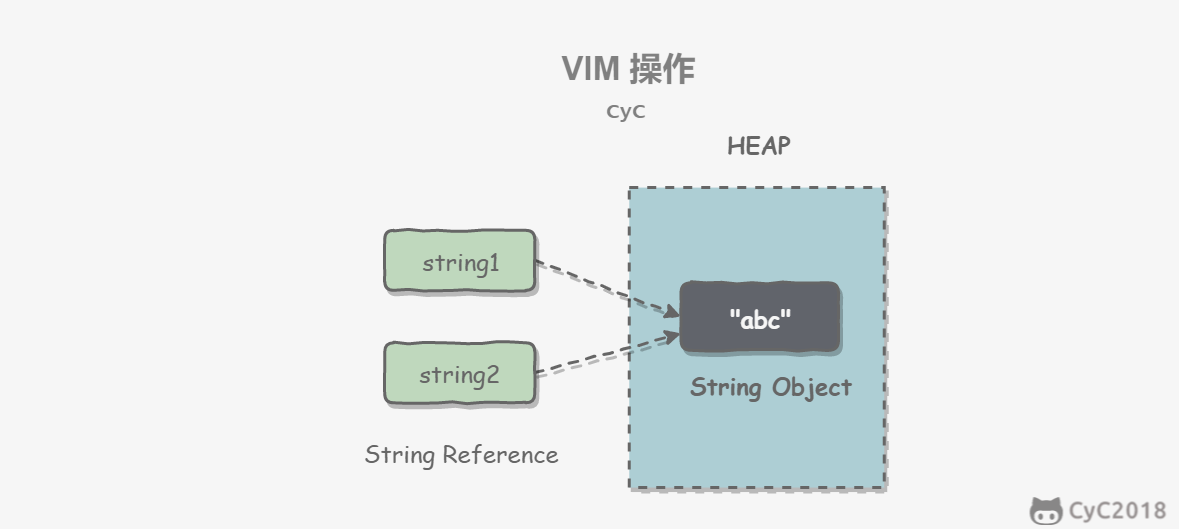
1 String原理概览String 被声明为 final,因此它不可被继承。(Integer 等包装类也不能被继承) 在 Java 8 中,String 内部使用 char 数组存储数据。 12345public final class String implements java.io.Serializable, Comparable<String>, CharSequence { /** The value is used for character storage. */ private final char value[];} 在 Java 9 之后,String 类的实现改用 byte 数组存储字符串,同时使用 coder 来标识使用了哪种编码。 12345678public final class String implements java.io.Serializable, Comparable<String>, CharSequence { /** The value is u...

2020-09-24
4内置类型
内置类型主要内置类型有数字、序列、映射、类、实例和异常。 有些多项集类是可变的。 它们用于添加、移除或重排其成员的方法将原地执行,并不返回特定的项,绝对不会返回多项集实例自身而是返回 None。 逻辑值检测任何对象都可以进行逻辑值的检测,以便在 if 或 while 作为条件或是作为下文所述布尔运算的操作数来使用。 一个对象在默认情况下均被视为真值,除非当该对象被调用时其所属类定义了 bool() 方法且返回 False 或是定义了 len() 方法且返回零。 下面基本完整地列出了会被视为假值的内置对象: 被定义为假值的常量: None 和 False。 任何数值类型的零: 0, 0.0, 0j, Decimal(0), Fraction(0, 1) 空的序列和多项集: ‘’, (), [], {}, set(), range(0) 产生布尔值结果的运算和内置函数总是返回 0 或 False 作为假值,1 或 True 作为真值,除非另行说明。 (重要例外:布尔运算 or 和 and 总是返回其中一个操作数。) 布尔运算布尔运算,按优先级升序排列: ...
2021-04-11
5 简化条件表达式
5 简化条件表达式1 Decompose Conditional(分解条件表达式)复杂的条件逻辑会降低代码的可读性,通过从if/else if/else三个段落中分别提炼出独立的函数,根据每一段落的用途命名函数,从而更清晰地表达自己的意图。 重构示例13123456// 重构前if (date.Before(SUMMER_START) || date.After(SUMMER_END)) { charge = quantity * m_winterRate + m_winterServiceCharge;} else { charge = quantity * m_summerRate;} 123456789101112131415161718192021// 重构后if (NotSummer(date)) { charge = WinterCharge(quantity);} else { charge = SummerCharge(quantity);}...

2020-09-26
custom_cmap
从颜色列表创建颜色映射有关创建和操作色彩映射的更多详细信息,请参阅在Matplotlib中创建色彩映射。 可以使用LinearSegmentedColormap的from_list()方法从颜色列表创建颜色映射。您必须传递一个RGB元组列表,用于定义从0到1的颜色混合。 创建自定义色彩映射也可以为色彩映射创建自定义映射。 这是通过创建字典来实现的,该字典指定RGB通道如何从cmap的一端变为另一端。 示例:假设您希望红色在下半部分从0增加到1,绿色在中间半部分增加到相同,而在上半部分则为蓝色。 然后你会用: 123456789101112cdict = {'red': ((0.0, 0.0, 0.0), (0.5, 1.0, 1.0), (1.0, 1.0, 1.0)), 'green': ((0.0, 0.0, 0.0), (0.25, 0.0, 0.0), ...

2023-08-13
06 协变返回类型
Java 协变返回类型是指在子类中重写一个方法时,该方法的返回类型可以是父类中该方法返回类型的子类。这意味着子类可以返回更具体的类型,而无需强制转换为父类类型。 例如,假设有一个父类 Animal 和一个子类 Dog,它们都有一个返回类型为 Animal 的方法 getAnimal。在 Dog 类中重写该方法时,可以将返回类型更改为 Dog,因为 Dog 是 Animal 的子类。这样一来,当调用 Dog 的 getAnimal 方法时,会返回一个 Dog 对象而不是 Animal 对象。 导出类(子类)覆盖(即重写)基类(父类)方法时,返回的类型可以是基类方法返回类型的子类。 123456789101112131415161718192021222324252627282930313233343536373839404142434445464748495051525354555657585960package com.evada.de;/** * @Author 云析学院 * Created by Ay on 2016/12/4. */public class Ay {...
2021-03-09
网络层学习之三(选路算法,ARP)
一、RIP 在因特网中,AS即自制系统内部使用的两个选路协议是RIP(路由信息协议,Routinginformation Protocol)和OSPF(Open Shortcut Path First)。 RIP是一种距离向量协议,运行方式和理想化的DV算法相似。在RIP中,DV算法中的费用采用的是跳数,即从源路由器到目的路由器的最短路径上的路由器数。RIP中一条路径的最大跳数被限制为15,因此RIP被限制用在网络直径不超过15的自制系统内。DV算法需要在路由器之间发送每个路由器的距离向量信息,RIP通过RIP通告(也称为RIP响应报文)来完成这个功能,RIP通告大约30秒相互交换一次。RIP通告包含了选路更新信息。 每台路由器都维护有一张选路表,它包含了路由器的距离向量个该路由器的转发表。 运行RIP协议的路由器每隔30秒就会发送RIP通告,如果一台路由器超过180秒还没收到邻居的RIP通告,它就认为邻居不再可达。此时它会更新自己的距离向量,并向相邻路由器通告该信息。 RIP也允许路由器主动发送请求报文请求某个邻居更新其路由信息,这是通过发送RIP请求报文实现的。RIP协议使用...




