
09.kubectl命令行
- 之前的部分按照操作内容,介绍操作的流程和原理。
- 这一部分主要对命令进行汇总
1 命令基础
命令格式
1 | kubectl [command] [type] [name] [flags] |
- command:子命令,用于操作Kubernetes集群资源对象的命 令,例如create、delete、describe、get、apply等。
- TYPE:资源对象的类型,区分大小写,能以单数、复数或者 简写形式表示。例如以下3种TYPE是等价的。
- kubectl get pod
- kubectl get pods
- kubectl get po
- NAME:资源对象的名称,区分大小写。如果不指定名称, 系统则将返回属于TYPE的全部对象的列表,也可以指定多个资源对象。
- kubectl get pods将返 回所有Pod的列表
- kubectl get pods pod1 pod2 pod3
- flags:kubectl子命令的可选参数,例如使用“-s”指定API Server的URL地址而不用默认值。
输出格式-o
- -o json 以json格式输出
- -o yaml 以yaml格式输出
- -o wide 输出额外信息
- -o name 金输出名字
资源类型
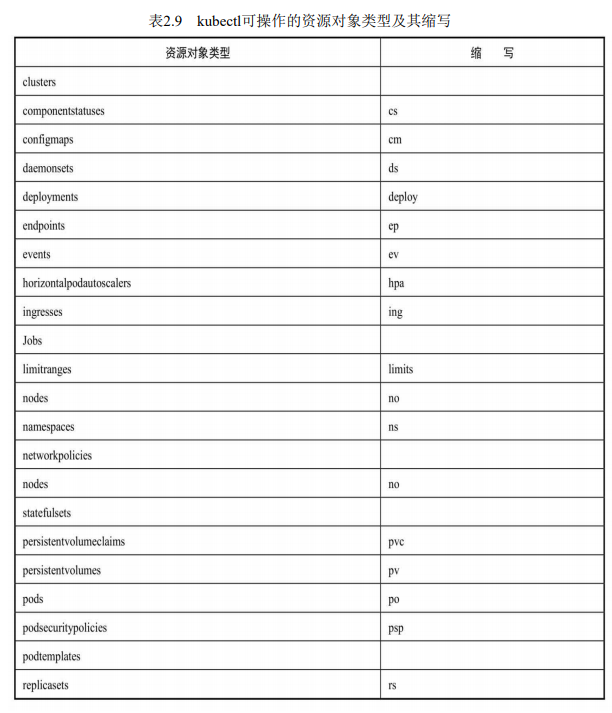
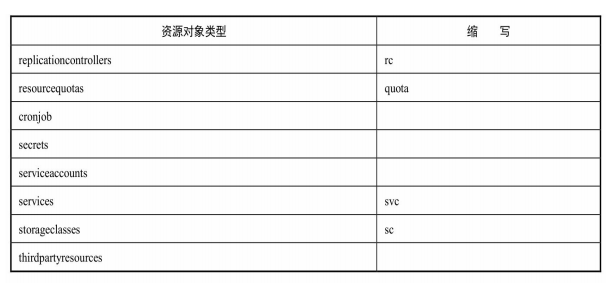
基本命令
1 | Basic Commands (Beginner): |
创建资源——create&apply
1 | 1.创建资源对象 根据YAML配置文件一次性创建Service和RC: |
查看资源——get
1 | 2、查看pod列表 |
编辑资源——edit
1 | ``` |
4、显示Node的详细信息:
kubectl describe node 192.168.0.212
kubectl describe nodes
5、显示Pod的详细信息:
kubectl describe pods
eg: kubectl describe pod redis-master-tqds9
6、显示由RC管理的Pod的信息:
kubectl describe pods
1 |
|
7、基于pod.yaml定义的名称删除Pod:
kubectl delete -f pod.yaml
8、删除所有包含某个Label的Pod和Service:
kubectl delete pod,svc -l name=
9、删除所有Pod:
kubectl delete pod –all
1 |
|
10、执行Pod的date命令,默认使用Pod中的第1个容器执行:
kubectl exec
11、指定Pod中的某个容器执行date命令:
kubectl exec
12、通过bash获得Pod中某个容器的TTY,相当于登录容器:
kubectl exec -it
1 |
|
一些常用的操作
● 进入运行中的pod执行命令。将某个程序的标准输入输出链接到当前的窗口。
kubectl attach -it nginx -c shell
-i 标准输入输出
-t tty表示窗口链接
-c 容器container名称
● 进入指定的容器中执行特定的命令
1 | kubectl exec -it mongodb mongo |
● 暂时服务化一个容器,将本机的端口映射到容器中某个服务的端口。
kubectl port-forward fortune 8080:80
● 永久服务化,创建一个持久化的服务
1 | # 创建一个服务对象 |
● 删除所有的pod和所有的资源
1 | kubectl delete pod --all -n custom-namespace |
kubectl错误排查的步骤
本博客所有文章除特别声明外,均采用 CC BY-NC-SA 4.0 许可协议。转载请注明来源 Estom的博客!
相关推荐

2021-03-09
Django-model
MVC模型中model部分,提供对数据库的操作支持。 配置文件settings.py DATABASES = { ‘default’: { ‘ENGINE’: ‘django.db.backends.mysql’, # 或者使用mysql.connector.django ‘NAME’: ‘test’, ‘USER’: ‘test’, ‘PASSWORD’: ‘test123’,‘HOST’:’localhost’, ‘PORT’:’3306’, } } django-admin.py startapp TestModel 创建模型,目录结构如下 HelloWorld|– TestModel| |– _init_.py| |– admin.py在管理界面中修改应用程序的模型| |– models.py 存储所有的应用程序的模型| |–tests.py 单元测试| |– views.p 应用程序的视图 对models.py的理解 # models.pyfrom django.db import modelsclass Test(models.Model): name &#...

2020-07-08
07 数据访问-3MyBatis
对象关系映射模型Hibernate。用来实现非常轻量级的对象的封装。将对象与数据库建立映射关系。实现增删查改。MyBatis与Hibernate非常相似。对象关系映射模型ORG。java对象与关系数据库映射的模型。 1 配置MyBatis最佳实践最佳实战:● 引入mybatis-starter● 配置application.yaml中,指定mapper-location位置即可● 编写Mapper接口并标注@Mapper注解● 简单方法直接注解方式● 复杂方法编写mapper.xml进行绑定映射● @MapperScan(“com.atguigu.admin.mapper”) 简化,其他的接口就可以不用标注@Mapper注解 添加MyBatis依赖12345678910<dependency> <groupId>org.mybatis.spring.boot</groupId> <artifactId>mybatis-spring-boot-starter</artifactId> <vers...

2020-09-26
10min
十分钟入门 Pandas本节是帮助 Pandas 新手快速上手的简介。烹饪指南里介绍了更多实用案例。 本节以下列方式导入 Pandas 与 NumPy: 123In [1]: import numpy as npIn [2]: import pandas as pd 生成对象详见数据结构简介文档。 用值列表生成 Series 时,Pandas 默认自动生成整数索引: 1234567891011In [3]: s = pd.Series([1, 3, 5, np.nan, 6, 8])In [4]: sOut[4]: 0 1.01 3.02 5.03 NaN4 6.05 8.0dtype: float64 用含日期时间索引与标签的 NumPy 数组生成 DataFrame: 12345678910111213141516171819In [5]: dates = pd.date_range('20130101', periods=6)In [6]: datesOut[6]: DatetimeIndex(['201...
2021-04-10
2.3 工厂方法
工厂方法别名 虚构造器 (Virtual Constructor) 意图 定义一个用于创建目标对象的接口,让子类决定实例化哪一个目标类。Factory Method 使一个类的实例化延迟到其子类。 Define an interface for creating an object, but let subclasses decide which class to instantiate.Factory Method lets a class defer instantiation to subclasses. 结构 参与者 Product 定义工厂方法所创建的对象的接口(Interface)。 ConcreteProduct 实现 Product 接口。 Creator 声明工厂方法,该方法返回一个 Product 类型的对象。 Creator也可以定义一个工厂方法的缺省实现,它返回一个缺省的 ConcreteProduct 对象。 可以调用工厂方法以创建一个 Product 对象。 ConcreteCreator 重定义(Override)工厂方法以创...

2021-03-09
Scrapy框架学习——Items使用
>准确的说,scrapy主要就有两部分可以编辑,一个使用来处理数据的scrapy.Items,另一个用来仓库 Item的操作包括创建、获取字段的值、设置字段的值、后去所欲的键、获取product列表、获取product字段、社赋值和浅复制、集成扩展item。 Item对象的操作 fields内置字段,是item生命中使用到的field对象的名字,是一个字典。
2021-03-08
2. 软件架构设计方法
软件架构设计方法目录1 面向对象2 信息隐藏3 继承和泛化4 并发处理5 设计模式6 软件架构和构件7 软件质量属性8 基于用例的软件生命周期9 需求、分析和设计建模活动 1 面向对象 这一部分请参考面线对象的课程笔记。 1.1 关键概念 对象类属性操作接口对象的接口是他提供的操作的集合。 2 信息隐蔽2.1 信息隐蔽基础接口是对象可见的部分,其他对象通过接口来调用操作 对象的数据结构发生变化时,不会对其他对象产生影响,只对拥有这个数据结构的对象(同一个类)有影响,并且,由于借口不变,对这个对象的操作调用不变。 基本模块是对象,信息隐藏的内容有栈对象。必须通过栈对象来访问操作。 2.2 信息隐蔽的实现数组实现的信息隐蔽策略链表实现的信息隐蔽策略2.3 信息隐藏对象的设计 首先设计信息隐蔽对象的外部接口 其次设计信息隐蔽对象的内部实现细节 3 继承和泛化3.1 作用 实现了代码的复用,是一种扩展机制 4 并发处理4.1 主动对象 主动对象=并发对象=并发过程=并发任务 拥有自己的空值线程,并且独立于其他对象进行执行 每个主动对象处理一个顺序...




