
05 Java IO网络
网络操作
1 网络编程基础
Java 中的网络支持:
- InetAddress:用于表示网络上的硬件资源,即 IP 地址;
- URL:统一资源定位符;
- Sockets:使用 TCP 协议实现网络通信;
- Datagram:使用 UDP 协议实现网络通信。
InetAddress
没有公有的构造函数,只能通过静态方法来创建实例。
1 | InetAddress.getByName(String host); |
URL
可以直接从 URL 中读取字节流数据。
1 | public static void main(String[] args) throws IOException { |
Sockets
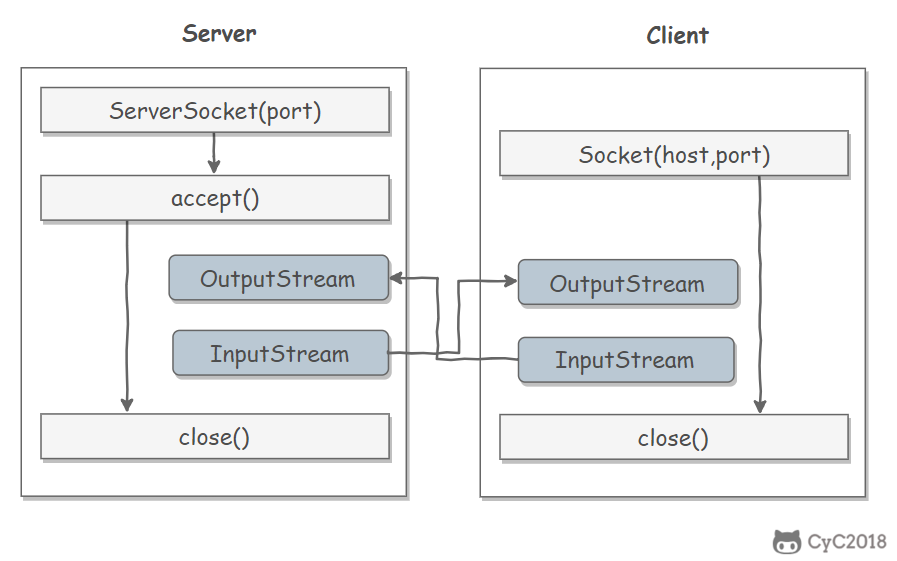
- ServerSocket:服务器端类
- Socket:客户端类
- 服务器和客户端通过 InputStream 和 OutputStream 进行输入输出。
Datagram
- DatagramSocket:通信类
- DatagramPacket:数据包类
2 BIO Socket编程
1 | public class PlainOioServer { |
3 NIO Socket编程
1 | public class NIOServer { |
1 | public class NIOClient { |
https://estom.github.io/2022/11/26/Java/05JavaIO%E7%BC%96%E7%A8%8B/05%20Java%20IO%E7%BD%91%E7%BB%9C/
本博客所有文章除特别声明外,均采用 CC BY-NC-SA 4.0 许可协议。转载请注明来源 Estom的博客!
相关推荐

2021-09-07
7.0-chinese
第7章 无锁并发数据结构设计本章主要内容 设计无锁并发数据结构 无锁结构中内存管理技术 对无锁数据结构设计的简单指导 上一章中,我们了解了在设计并发数据结构时会遇到的问题,根据指导意见指引,确定设计的安全性。对一些通用数据结构进行检查,并查看使用互斥锁对共享数据进行保护的实现例子。第一组例子就是使用单个互斥量来保护整个数据结构,但之后的例子就会使用多个锁来保护数据结构的不同部分,并且允许对数据结构进行更高级别的并发访问。 互斥量是一个强大的工具,其可以保证在多线程情况下可以安全的访问数据结构,并且不会有条件竞争或破坏不变量的情况存在。对于使用互斥量的代码,其原因也是很简单的:就是让互斥量来保护数据。不过,这并不会如你所想的那样;你可以回看一下第3章,回顾一下死锁形成的原因,再回顾一下基于锁的队列和查询表的例子,看一下细粒度锁是如何影响并发的。如果你能写出一个无锁并发安全的数据结构,那么就能避免这些问题。 在本章中,我们还会使用原子操作(第5章介绍)的“内存序”特性,并使用这个特性来构建无锁数据结构。设计这样的数据结构时,要格外的小心,因为这样的数据机构不是那么容易正确实现的,...

2021-04-19
4 管理包
管理包1. 查找可供安装的包版本精确查找1conda search --full-name <package_full_name> 注意: –full-name为精确查找的参数。 是被查找包的全名。包名两边不加尖括号“<>”。 例如:conda search –full-name python即查找全名为“python”的包有哪些版本可供安装。 模糊查找1conda search <text> 注意:是查找含有此字段的包名。此字段两边不加尖括号“<>”。 例如:conda search py即查找含有“py”字段的包,有哪些版本可供安装。 2. 获取当前环境中已安装的包信息1conda list 执行上述命令后将在终端显示当前环境已安装包的包名及其版本号。 3. 安装包在指定环境中安装包1conda install --name <env_name> <package_name> 注意: 即将包安装的指定环境名。环境名两边不加尖括号“<>”。 即要安装的包名。包名两边不加尖...
2023-11-26
08 单元测试
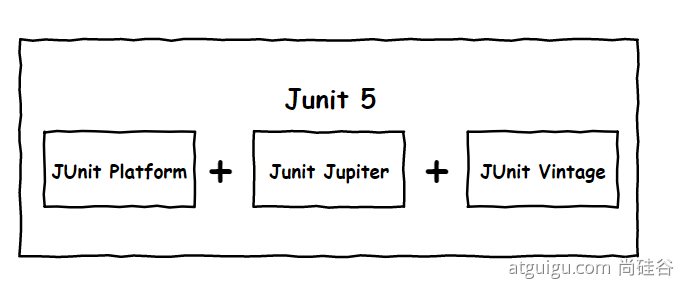
springboot with junit4 &junit5 https://segmentfault.com/a/1190000040803747 1 概述spring-boot-starter-testSpringBoot中有关测试的框架,主要来源于 spring-boot-starter-test。一旦依赖了spring-boot-starter-test,下面这些类库将被一同依赖进去: JUnit:java测试事实上的标准。 Spring Test & Spring Boot Test:Spring的测试支持。 AssertJ:提供了流式的断言方式。 Hamcrest:提供了丰富的matcher。 Mockito:mock框架,可以按类型创建mock对象,可以根据方法参数指定特定的响应,也支持对于mock调用过程的断言。 JSONassert:为JSON提供了断言功能。 JsonPath:为JSON提供了XPATH功能。 多种测试模式 @RunWith(SpringJUnit4ClassRunner.class)启动Spring上下文环境。 @Ru...

2022-04-18
html-introduce
什么是 HTMLHTML 的全称为 Hyper Text Markup Language,译为超文本标记语言。 超文本,就是指页面内可以包含图片、链接,甚至音乐、程序等非文字元素。 标记语言,是一种将文本以及文本相关的其他信息结合起来,展现出关于文档结构和数据处理细节的电脑文字编码。与文本相关的其他信息(包括例如文本的结构和表示信息等)与原来的文本结合在一起,但是使用标记进行标识。 发展历史1980年,蒂姆·伯纳斯-李为使世界各地的物理学家能够方便的进行合作研究,创建了使用于其系统的 HTML。Tim Berners-Lee 设计的 HTML 以纯文字格式为基础,可以使用任何文本编辑器处理,最初仅有少量标记(TAG)而易于掌握运用。随着 HTML 使用率的增加,人们不满足只能看到文字。 1993年,还是大学生的马克·安德生在他的 Mosaic 浏览器加入 <img> 标记,从此可以在 Web 页面上浏览图片。但人们认为仅有图片还是不够,希望可将任何形式的媒体加到网页上。因此 HTML 不断地扩充和发展。 标准的版本历史 超文本标记语言(第一版)—— 在 1993 年 ...
2021-04-11
附录1 代码重构理论
重构 参考文献 https://www.cnblogs.com/ranjiewen/p/5912259.html https://blog.csdn.net/ruanrunxue/article/details/102945431 1 什么是重构?重构的定义Martin Fowler在《重构:改善既有代码的设计》一书中给出了重构的两个定义. 第一个是名词形式:Refactoring: 对软件内部结构的一种调整,目的是在不改变软件可观察行为的前提下,提高其可理解性,降低其修改成本. 第二个是动词形式:Refactor: 使用一系列重构手法,在不改变软件可观察行为的前提下,调整其结构. 重构的目标重构的目标是什么? 重构的目标绝不是将代码从别人的taste改成自己的taste,也不是将代码从一种坏味道改到另一种坏味道!Matin Fowler利用上面两个定义,指出了重构的目标: 不改变软件可观察行为 提高软件可理解性 降低软件修改成本 而对于上述目标,我们再深入一点分析,发现其实已经有更经典的定义. 那就是Kent Beck的简单设计四原则: Pass All Tes...

2021-12-24
tcpdump
tcpdump一款sniffer工具,是Linux上的抓包工具,嗅探器 补充说明tcpdump命令 是一款抓包,嗅探器工具,它可以打印所有经过网络接口的数据包的头信息,也可以使用-w选项将数据包保存到文件中,方便以后分析。 语法1tcpdump(选项) 选项12345678910111213141516171819202122232425-a:尝试将网络和广播地址转换成名称;-c<数据包数目>:收到指定的数据包数目后,就停止进行倾倒操作;-d:把编译过的数据包编码转换成可阅读的格式,并倾倒到标准输出;-dd:把编译过的数据包编码转换成C语言的格式,并倾倒到标准输出;-ddd:把编译过的数据包编码转换成十进制数字的格式,并倾倒到标准输出;-e:在每列倾倒资料上显示连接层级的文件头;-f:用数字显示网际网络地址;-F<表达文件>:指定内含表达方式的文件;-i<网络界面>:使用指定的网络截面送出数据包;-l:使用标准输出列的缓冲区;-n:不把主机的网络地址转换成名字;-N:不列出域名;-O:不将数据包编码最佳化;-p:不让网络界面进入混杂模式;-q...




