
12-组件化高级
1 | <!-- 父组件 --> |
1 | <!-- 子组件 --> |
1 | <cpn></cpn> |
1 | <!-- 父组件 --> |
1 | <!-- 插槽的基本使用使用<slot></slot> --> |
1 | <!-- 父组件 --> |
1 |
|
1 |
|
本博客所有文章除特别声明外,均采用 CC BY-NC-SA 4.0 许可协议。转载请注明来源 Estom的博客!
相关推荐

2022-12-04
综合练习-实现Tab-Bar
1. 实现Tab-Bar思路 下方单独的Tab-Bar组件如何封装? 自定义Tab-Bar组件,在APP中使用 让Tab-Bar位置在底部,并设置你需要的样式 Tab-Bar中显示的内容由外部决定 定义插槽 flex布局平分Tab-Bar 自定义Tab-Bar-Item,可以传入图片和文字 定义Tab-Bar-Item,并定义两个插槽:图片和文字 给插槽外层包装div,设置样式 填充插槽,实现底部Tab-Bar的效果 传入高亮图片 定义另一个插槽,插入active-icon的数据 定义一个变量isActicve,通过v-show来决定是否显示对应的icon Tab-Bar-Item绑定路由数据 安装路由:npm install vue-router --save 在router/index.js配置路由信息,并创建对应的组件 main.js中注册router App.vue中使用router-link和router-view 点击item跳转到对应的路由,并且动态决定isActive 监听item的点击,通过this.$router.replace()替换路...

2022-12-05
21.Redis中如何实现的消息队列?实现的方式有几种?
Redis 中如何实现的消息队列?实现的方式有几种?细心的你可能发现了,本系列课程中竟然出现了三篇都是在说消息队列,第10篇时讲了程序级别的消息队列以及延迟消息队列的实现,而第15篇讲了常见的消息队列中间件 RabbitMQ、Kafka 等,由此可见消息队列在整个 Java 技术体系中的重要程度。本课时我们将重点来看一下 Redis 是如何实现消息队列的。 我们本课时的面试题是,在 Redis 中实现消息队列的方式有几种? 典型回答早在 Redis 2.0 版本之前使用 Redis 实现消息队列的方式有两种: 使用 List 类型实现使用 ZSet 类型实现其中使用List 类型实现的方式最为简单和直接,它主要是通过 lpush、rpop 存入和读取实现消息队列的,如下图所示: lpush 可以把最新的消息存储到消息队列(List 集合)的首部,而 rpop 可以读取消息队列的尾部,这样就实现了先进先出,如下图所示: 命令行的实现命令如下: 12345678127.0.0.1:6379> lpush mq "java" #推送消息 java(inte...
2021-04-10
3.5 外观
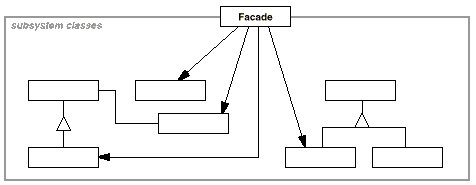
意图 为子系统中的一组接口提供一个一致的界面,Facade模式定义了一个高层接口,这个接口使得这一子系统更加容易使用。 Provide a unified interface to a set of interfaces in a subsystem. Facadedefines a higher-level interface that makes the subsystem easier to use. 结构 参与者 Facade 知道哪些子系统类负责处理请求。 将客户的请求代理给适当的子系统对象。 Subsystem Classes 实现子系统的功能。 处理由 Facade 对象指派的任务。 没有 Facade 的任何相关信息。 适用性 在以下情况下可以使用 Facade 模式: 当你要为一个复杂子系统提供一个简单接口时。 客户程序与抽象类的实现部分之间存在着很大的依赖性。 当你需要构建一个层次结构的子系统时,使用 Facade模式定义子系统中每层的入口点。 效果 它对客户屏蔽子系统组件,使用 Facade 的客户程序不需要直接访问子系统对象。...

2022-11-09
注解编程01-spring
注解总结 注解位置 类注解@Component、@Repository、@Controller、@Service以及JavaEE6的@ManagedBean和@Named注解 方法注解 @Bean、@Autowire、@Value、@Resource以及EJB和WebService相关的注解等 属性注解 必须被扫描到的类启动类@SpringBootApplication--@ComponentScan–>扫描类@Component->扫描方法@Bean 1 配置类相关注解 启动Spring扫描的基础类。 @SpringBootApplication@SpringBootApplication申明让spring boot自动给程序进行必要的配置,这个配置等同于:@Configuration ,@EnableAutoConfiguration 和 @ComponentScan 三个配置。 使用了此注解的类首先会让Spring Boot启动对base package以及其sub-pacakage下的类进行component scan。 @ComponentScan@...
2021-04-08
2.2 简单工厂
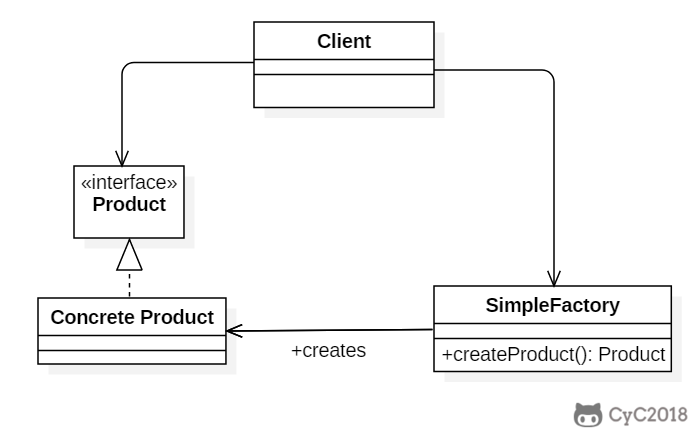
简单工厂(Simple Factory)Intent在创建一个对象时不向客户暴露内部细节,并提供一个创建对象的通用接口。 Class Diagram简单工厂把实例化的操作单独放到一个类中,这个类就成为简单工厂类,让简单工厂类来决定应该用哪个具体子类来实例化。 这样做能把客户类和具体子类的实现解耦,客户类不再需要知道有哪些子类以及应当实例化哪个子类。客户类往往有多个,如果不使用简单工厂,那么所有的客户类都要知道所有子类的细节。而且一旦子类发生改变,例如增加子类,那么所有的客户类都要进行修改。 Implementation12public interface Product {} 12public class ConcreteProduct implements Product {} 12public class ConcreteProduct1 implements Product {} 12public class ConcreteProduct2 implements Product {} ...

2021-03-08
TensorFlow-code kernels
http://www.360doc.com/content/17/0307/19/39202731_634787879.shtml kernels简介TF中包含大量Op算子,这些算子组成Graph的节点集合。这些算子对Tensor实现相应的运算操作。 OpKernel类(core/framework/op_kernel.h)是所有Op类的基类。继承OpKernel还可以自定义新的Op类。用的较多的Op如(MatMul, Conv2D, SoftMax, AvgPooling, Argmax等)。 所有Op包含注册(Register Op)和实现(正向计算、梯度定义)两部分。 所有Op类的实现需要overide抽象基函数 void Compute(OpKernelContext* context),实现自身Op功能。用户可以根据需要自定义新的Op操作,参考[12]。 TF中所有Op操作的属性定义和描述都在 ops/ops.pbtxt。如下Add操作,定义了输入参数x、y,输出参数z。 下面介绍不同的op实现的办法 UnaryOp & ...




