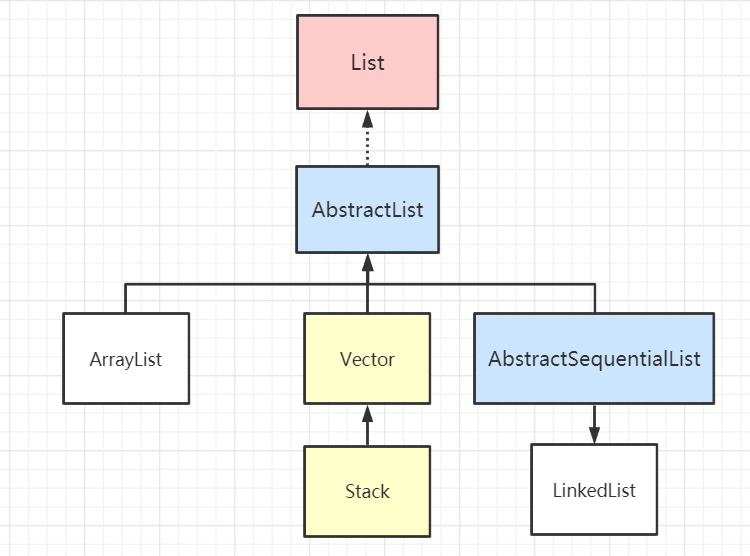
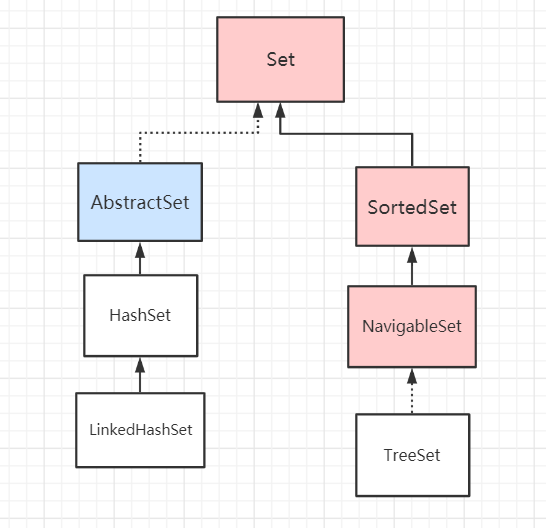
List 接口 0 概述 简介 List 接口和 Set 接口齐头并进,是我们日常开发中接触的很多的一种集合类型了。整个 List 集合的组成部分如下图
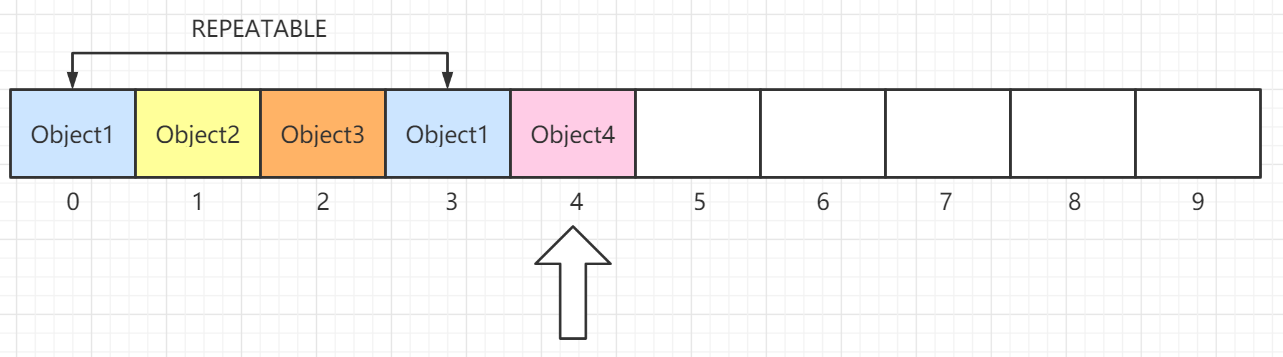
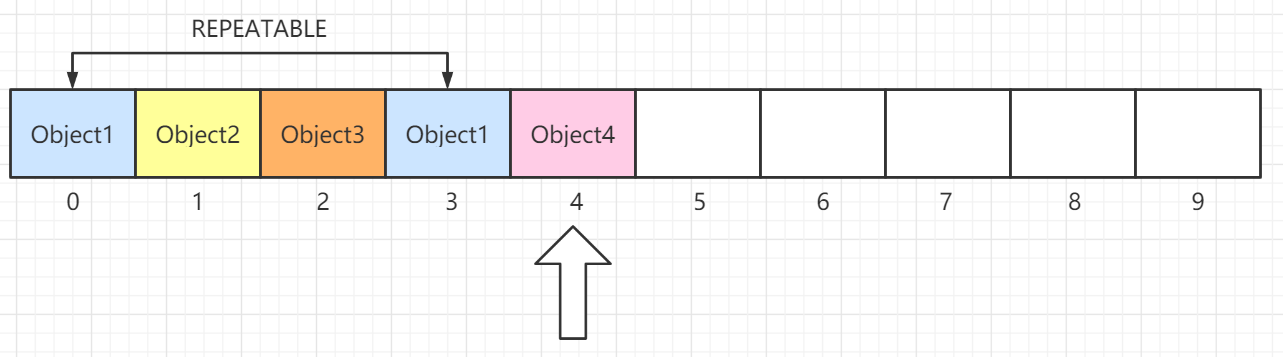
List 接口直接继承 Collection 接口,它定义为可以存储重复 元素的集合,并且元素按照插入顺序有序排列 ,且可以通过索引 访问指定位置的元素。常见的实现有:ArrayList、LinkedList、Vector和Stack
AbstractList 和 AbstractSequentialList AbstractList 抽象类实现了 List 接口,其内部实现了所有的 List 都需具备的功能,子类可以专注于实现自己具体的操作逻辑。
1 2 3 4 5 public int indexOf (Object o) public int lastIndexOf (Object o)
AbstractSequentialList 抽象类继承了 AbstractList,在原基础上限制了访问元素的顺序只能够按照顺序访问 ,而不支持随机访问 ,如果需要满足随机访问的特性,则继承 AbstractList。子类 LinkedList 使用链表实现,所以仅能支持顺序访问 ,顾继承了 AbstractSequentialList而不是 AbstractList。
1 ArrayList ArrayList底层原理 1. 概览 因为 ArrayList 是基于数组实现的,所以支持快速随机访问。RandomAccess 接口标识着该类支持快速随机访问。
1
2
public class ArrayList <E> extends AbstractList <E> implements List <E>, RandomAccess, Cloneable, java.io.Serializable
数组的默认大小为 10。
1 private static final int DEFAULT_CAPACITY = 10 ;
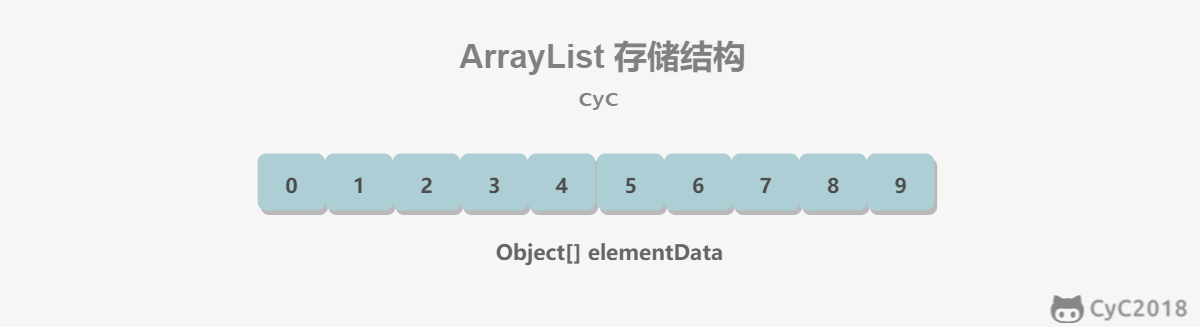
ArrayList 以数组 作为存储结构,它是线程不安全 的集合;具有查询快、在数组中间或头部增删慢 的特点,所以它除了线程不安全这一点,其余可以替代Vector,而且线程安全的 ArrayList 可以使用 CopyOnWriteArrayList代替 Vector。
关于 ArrayList 有几个重要的点需要注意的:
具备随机访问 特点,访问元素的效率 较高,ArrayList 在频繁插入、删除 集合元素的场景下效率较低。
底层数据结构:ArrayList 底层使用数组作为存储结构,具备查找快、增删慢 的特点
线程安全性:ArrayList 是线程不安全 的集合
ArrayList 首次扩容 后的长度为 10,调用 add() 时需要计算容器的最小容量。可以看到如果数组elementData为空数组,会将最小容量设置为10,之后会将数组长度完成首次扩容到 10。
另外一篇文章
Ordered – arraylist中的元素保留其排序,默认情况下是其添加到列表的顺序。
Index based –可以使用索引位置随机访问元素。 索引以’0’开头。
Dynamic resizing –当需要添加的元素数量超过当前大小时,ArrayList会动态增长。
Non synchronized –默认情况下,ArrayList不同步。 程序员需要适当地使用synchronized关键字,或者仅使用Vector类。
Duplicates allowed -我们可以在arraylist中添加重复元素。 不能成组放置。
1 2 3 4 5 6 7 8 9 10 11 private static final Object[] DEFAULTCAPACITY_EMPTY_ELEMENTDATA = {};private static final int DEFAULT_CAPACITY = 10 ;private static int calculateCapacity (Object[] elementData, int minCapacity) { if (elementData == DEFAULTCAPACITY_EMPTY_ELEMENTDATA) { return Math.max(DEFAULT_CAPACITY, minCapacity); } return minCapacity; }
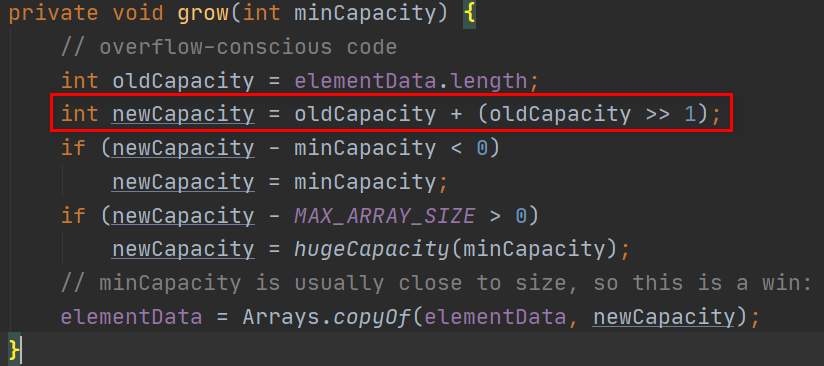
集合从第二次扩容 开始,数组长度将扩容为原来的 1.5 倍,即:newLength = oldLength * 1.5
2. 扩容 添加元素时使用 ensureCapacityInternal() 方法来保证容量足够,如果不够时,需要使用 grow() 方法进行扩容,新容量的大小为 oldCapacity + (oldCapacity >> 1),即 oldCapacity+oldCapacity/2。其中 oldCapacity >> 1 需要取整,所以新容量大约是旧容量的 1.5 倍左右。(oldCapacity 为偶数就是 1.5 倍,为奇数就是 1.5 倍-0.5)
扩容操作需要调用 Arrays.copyOf() 把原数组整个复制到新数组中,这个操作代价很高,因此最好在创建 ArrayList 对象时就指定大概的容量大小,减少扩容操作的次数。
1
2
3
4
5
6
7
8
9
10
11
12
13
14
15
16
17
18
19
20
21
22
23
24
25
26
27
28
29
30
31
public boolean add (E e) { ensureCapacityInternal(size + 1 ); elementData[size++] = e; return true ; } private void ensureCapacityInternal (int minCapacity) { if (elementData == DEFAULTCAPACITY_EMPTY_ELEMENTDATA) { minCapacity = Math.max(DEFAULT_CAPACITY, minCapacity); } ensureExplicitCapacity(minCapacity); } private void ensureExplicitCapacity (int minCapacity) { modCount++; if (minCapacity - elementData.length > 0 ) grow(minCapacity); } private void grow (int minCapacity) { int oldCapacity = elementData.length; int newCapacity = oldCapacity + (oldCapacity >> 1 ); if (newCapacity - minCapacity < 0 ) newCapacity = minCapacity; if (newCapacity - MAX_ARRAY_SIZE > 0 ) newCapacity = hugeCapacity(minCapacity); elementData = Arrays.copyOf(elementData, newCapacity); }
3. 删除元素 需要调用 System.arraycopy() 将 index+1 后面的元素都复制到 index 位置上,该操作的时间复杂度为 O(N),可以看到 ArrayList 删除元素的代价是非常高的。
1
2
3
4
5
6
7
8
9
10
public E remove (int index) { rangeCheck(index); modCount++; E oldValue = elementData(index); int numMoved = size - index - 1 ; if (numMoved > 0 ) System.arraycopy(elementData, index+1 , elementData, index, numMoved); elementData[--size] = null ; return oldValue; }
4. 序列化 ArrayList 基于数组实现,并且具有动态扩容特性,因此保存元素的数组不一定都会被使用,那么就没必要全部进行序列化。
保存元素的数组 elementData 使用 transient 修饰,该关键字声明数组默认不会被序列化。
1 transient Object[] elementData;
ArrayList 实现了 writeObject() 和 readObject() 来控制只序列化数组中有元素填充那部分内容。
1
2
3
4
5
6
7
8
9
10
11
12
13
14
15
16
17
18
19
20
21
private void readObject (java.io.ObjectInputStream s) throws java.io.IOException, ClassNotFoundException { elementData = EMPTY_ELEMENTDATA; s.defaultReadObject(); s.readInt(); if (size > 0 ) { ensureCapacityInternal(size); Object[] a = elementData; for (int i=0 ; i<size; i++) { a[i] = s.readObject(); } } }
1
2
3
4
5
6
7
8
9
10
11
12
13
14
15
16
17
18
private void writeObject (java.io.ObjectOutputStream s) throws java.io.IOException{ int expectedModCount = modCount; s.defaultWriteObject(); s.writeInt(size); for (int i=0 ; i<size; i++) { s.writeObject(elementData[i]); } if (modCount != expectedModCount) { throw new ConcurrentModificationException (); } }
序列化时需要使用 ObjectOutputStream 的 writeObject() 将对象转换为字节流并输出。而 writeObject() 方法在传入的对象存在 writeObject() 的时候会去反射调用该对象的 writeObject() 来实现序列化。反序列化使用的是 ObjectInputStream 的 readObject() 方法,原理类似。
1
2
3
ArrayList list = new ArrayList ();ObjectOutputStream oos = new ObjectOutputStream (new FileOutputStream (file));oos.writeObject(list);
5. Fail-Fast modCount 用来记录 ArrayList 结构发生变化的次数。结构发生变化是指添加或者删除至少一个元素的所有操作,或者是调整内部数组的大小,仅仅只是设置元素的值不算结构发生变化。
在进行序列化或者迭代等操作时,需要比较操作前后 modCount 是否改变,如果改变了需要抛出 ConcurrentModificationException。代码参考上节序列化中的 writeObject() 方法。
构造函数
没有逐个元素初始化的方法,使用Arrays.asList能够添加对象初始化。
1 2 3 4 5 List<String> names = new ArrayList <>(); List<Integer> numbers = new ArrayList <>(Arrays.asList(1 ,2 ,3 ,4 ,5 ));
常用方法
1
2
3
4
5
public boolean add (E e) { ensureCapacityInternal(size + 1 ); elementData[size++] = e; return true ; }
addAll()方法将给定集合的所有元素添加到arraylist中。 始终使用泛型来确保您仅在给定列表中添加某种类型的元素。
1
2
3
4
5
6
7
8
9
10
11
12
13
14
15
16
17
18
19
20
21
22
import java.util.ArrayList; public class ArrayListExample { public static void main (String[] args) { ArrayList<String> list1 = new ArrayList <>(); list1.add("A" ); list1.add("B" ); list1.add("C" ); list1.add("D" ); ArrayList<String> list2 = new ArrayList <>(); list2.add("E" ); list1.addAll(list2); System.out.println(list1); } }
clear()方法将arraylist clear
1
2
3
4
5
6
7
8
9
10
11
12
13
14
15
16
17
18
19
20
import java.util.ArrayList; public class ArrayListExample { public static void main (String[] args) { ArrayList<String> arrayList = new ArrayList <>(); arrayList.add("A" ); arrayList.add("B" ); arrayList.add("C" ); arrayList.add("D" ); System.out.println(arrayList); arrayList.clear(); System.out.println(arrayList); } }
clone()方法创建arraylist的浅表副本 。
1
2
3
4
5
6
7
8
9
10
11
12
13
14
15
16
17
18
19
20
21
import java.util.ArrayList; public class ArrayListExample { @SuppressWarnings("unchecked") public static void main (String[] args) { ArrayList<String> arrayListObject = new ArrayList <>(); arrayListObject.add("A" ); arrayListObject.add("B" ); arrayListObject.add("C" ); arrayListObject.add("D" ); System.out.println(arrayListObject); ArrayList<String> arrayListClone = (ArrayList<String>) arrayListObject.clone(); System.out.println(arrayListClone); } }
clone深拷贝。创建集合的深层副本非常容易。 我们需要创建一个新的collection实例,并将给定collection中的所有元素一一复制到克隆的collection中。 请注意,我们将在克隆集合中复制元素的克隆。
1
2
3
4
5
6
7
8
9
10
ArrayList<Employee> employeeList = new ArrayList <>(); ArrayList<Employee> employeeListClone = new ArrayList <>(); Iterator<Employee> iterator = employeeList.iterator(); while (iterator.hasNext()){ employeeListClone.add((Employee) iterator.next().clone()); }
cantains()数组列表中存储了几个字母。 我们将尝试找出列表中是否包含字母“ A”和“ Z”。
1
2
3
4
5
6
7
8
9
10
11
12
13
14
15
16
public class ArrayListExample { public static void main (String[] args) { ArrayList<String> list = new ArrayList <>(2 ); list.add("A" ); list.add("B" ); list.add("C" ); list.add("D" ); System.out.println( list.contains("A" ) ); System.out.println( list.contains("Z" ) ); } }
indexOf()判断是否存在.返回此列表中指定元素的首次出现的索引。 如果列表不包含元素,它将返回’-1’ 。
1
2
3
4
5
6
7
8
9
10
11
12
13
14
15
16
public class ArrayListExample { public static void main (String[] args) { ArrayList<String> list = new ArrayList <>(2 ); list.add("A" ); list.add("B" ); list.add("C" ); list.add("D" ); System.out.println( list.indexOf("A" ) > 0 ); System.out.println( list.indexOf("Z" ) > 0 ); } }
lastIndexOf()返回此列表中最后一次出现的指定元素的索引。 如果列表不包含元素,它将返回’-1’ 。
1
2
3
4
5
6
7
8
9
10
11
12
13
public int lastIndexOf (Object object) { if (o == null ) { for (int i = size-1 ; i >= 0 ; i--) if (elementData[i]==null ) return i; } else { for (int i = size-1 ; i >= 0 ; i--) if (o.equals(elementData[i])) return i; } return -1 ; }
get(int index)方法返回列表中指定位置’index’处的元素。
1
2
3
4
5
6
7
8
9
10
11
12
13
14
15
16
import java.util.ArrayList;import java.util.Arrays; public class ArrayListExample { public static void main (String[] args) { ArrayList<String> list = new ArrayList <>(Arrays.asList("alex" , "brian" , "charles" , "dough" )); String firstName = list.get(0 ); String secondName = list.get(1 ); System.out.println(firstName); System.out.println(secondName); } }
boolean remove(Object o) –从列表中删除第一次出现的指定元素。 true从列表中删除了任何元素,则返回true ,否则返回false 。对象remove(int index)引发IndexOutOfBoundsException-移除此列表中指定位置的元素。 将所有后续元素向左移动。 返回从列表中移除的元素。 如果参数索引无效,则引发异常。
1
2
3
4
5
6
7
8
9
10
11
12
13
14
15
16
17
18
19
20
import java.util.ArrayList;import java.util.Arrays; public class ArrayListExample { public static void main (String[] args) throws CloneNotSupportedException { ArrayList<String> alphabets = new ArrayList <>(Arrays.asList("A" , "B" , "C" , "D" )); System.out.println(alphabets); alphabets.remove("C" ); System.out.println(alphabets); alphabets.remove("Z" ); System.out.println(alphabets); } }
removeAll()方法遍历arraylist的所有元素。 对于每个元素,它将元素传递给参数集合的contains()方法。如果在参数集合中找到element,它将重新排列索引。 如果未找到element,则将其保留在后备数组中。
1
2
3
4
5
6
7
8
9
10
11
12
13
14
15
16
17
import java.util.ArrayList;import java.util.Arrays;import java.util.Collections; public class ArrayListExample { public static void main (String[] args) throws CloneNotSupportedException { ArrayList<String> alphabets = new ArrayList <>(Arrays.asList("A" , "B" , "A" , "D" , "A" )); System.out.println(alphabets); alphabets.removeAll(Collections.singleton("A" )); System.out.println(alphabets); } }
removeIf()方法采用Predicate类型的单个参数。 谓词接口是一种功能接口,表示一个参数的条件(布尔值函数)。 它检查给定参数是否满足条件。
1
2
3
4
5
6
7
8
9
10
11
12
13
14
15
import java.util.ArrayList;import java.util.Arrays; public class ArrayListExample { public static void main (String[] args) throws CloneNotSupportedException { ArrayList<Integer> numbers = new ArrayList <>(Arrays.asList(1 ,2 ,3 ,4 ,5 ,6 ,7 ,8 ,9 ,10 )); numbers.removeIf( number -> number%2 == 0 ); System.out.println(numbers); } }
retainAll()方法来保留列表中存在于指定参数集合中的所有元素。
1
2
3
4
5
6
7
8
9
10
11
12
13
14
15
16
17
import java.util.ArrayList;import java.util.Arrays;import java.util.Collections; public class ArrayListExample { public static void main (String[] args) throws CloneNotSupportedException { ArrayList<String> alphabets = new ArrayList <>(Arrays.asList("A" , "B" , "A" , "D" , "A" )); System.out.println(alphabets); alphabets.retainAll(Collections.singleton("A" )); System.out.println(alphabets); } }
sort()方法使用Arrays.sort()方法对列表中的元素进行比较和排序。sort()方法接受Comparator实现类的实例,该实例必须能够比较arraylist中包含的元素
1
2
3
4
5
6
7
8
9
10
11
12
13
14
15
16
17
18
19
20
21
22
23
24
25
26
27
28
29
30
31
32
import java.util.Comparator; public class NameSorter implements Comparator <Employee> { @Override public int compare (Employee o1, Employee o2) { return o1.getName().compareToIgnoreCase(o1.getName()); } } import java.time.LocalDate;import java.time.Month;import java.util.ArrayList; public class ArrayListExample { public static void main (String[] args) throws CloneNotSupportedException { ArrayList<Employee> employees = new ArrayList <>(); employees.add(new Employee (1l , "Alex" , LocalDate.of(2018 , Month.APRIL, 21 ))); employees.add(new Employee (4l , "Brian" , LocalDate.of(2018 , Month.APRIL, 22 ))); employees.add(new Employee (3l , "David" , LocalDate.of(2018 , Month.APRIL, 25 ))); employees.add(new Employee (5l , "Charles" , LocalDate.of(2018 , Month.APRIL, 23 ))); employees.add(new Employee (2l , "Edwin" , LocalDate.of(2018 , Month.APRIL, 24 ))); employees.sort(new NameSorter ()); System.out.println(employees); } }
toArray()将arraylist转换为对象数组并遍历数组内容
1
2
3
4
5
6
7
8
9
10
11
12
13
14
15
16
17
18
19
20
21
22
23
24
25
26
27
28
29
30
31
32
33
34
35
36
37
38
39
40
41
42
43
44
45
46
47
48
import java.util.ArrayList;import java.util.Arrays; public class ArrayListExample { public static void main (String[] args) { ArrayList<String> list = new ArrayList <>(2 ); list.add("A" ); list.add("B" ); list.add("C" ); list.add("D" ); Object[] array = list.toArray(); System.out.println( Arrays.toString(array) ); for (Object o : array) { String s = (String) o; System.out.println(s); } } } import java.util.ArrayList;import java.util.Arrays; public class ArrayListExample { public static void main (String[] args) { ArrayList<String> list = new ArrayList <>(2 ); list.add("A" ); list.add("B" ); list.add("C" ); list.add("D" ); String[] array = list.toArray(new String [list.size()]); System.out.println(Arrays.toString(array)); } }
1
2
3
4
5
6
7
8
9
10
11
12
13
14
import java.util.ArrayList;import java.util.Arrays; public class ArrayListExample { public static void main (String[] args) { ArrayList<Integer> list = new ArrayList <>(Arrays.asList(0 ,1 ,2 ,3 ,4 ,5 ,6 ,7 ,8 ,9 )); ArrayList<Integer> sublist = new ArrayList <Integer>( list.subList(2 , 6 ) ); System.out.println(sublist); } }
遍历方法 五种loop ArrayList
Java程序使用standard for loop遍历对象的数组列表。(能够控制遍历计数,方便进行排序等算法操作)
1
2
3
4
5
6
ArrayList<String> namesList = new ArrayList <String>(Arrays.asList( "alex" , "brian" , "charles" ) ); for (int i = 0 ; i < namesList.size(); i++){ System.out.println(namesList.get(i)); }
使用foreach loop遍历对象的数组列表。(最方便的遍历。)
1
2
3
4
5
6
ArrayList<String> namesList = new ArrayList <String>(Arrays.asList( "alex" , "brian" , "charles" ) ); for (String name : namesList){ System.out.println(name); }
使用列表迭代器对象迭代对象的数组列表。(能够在遍历的时候删除。)
1
2
3
4
5
6
7
8
ArrayList<String> namesList = new ArrayList <String>(Arrays.asList( "alex" , "brian" , "charles" ) ); ListIterator<String> listItr = namesList.listIterator(); while (listItr.hasNext()){ System.out.println(listItr.next()); }
while循环。(可能在某些算法中比较方便,除非你想让循环体控制遍历计数)
1
2
3
4
5
6
7
ArrayList<String> namesList = new ArrayList <String>(Arrays.asList( "alex" , "brian" , "charles" ) ); int index = 0 ; while (namesList.size() > index) { System.out.println(namesList.get(index++)); }
使用Java 8流API遍历对象的数组列表。 使用stream.foreach()方法从arraylist对象创建元素流,并stream.foreach()获取元素。
1
2
3
Iterate arraylist with stream api ArrayList<String> namesList = new ArrayList <String>(Arrays.asList( "alex" , "brian" , "charles" ) ); namesList.forEach(name -> System.out.println(name));
listIterator()方法获得的列表迭代器来迭代arraylist。ListIterator支持在迭代列表时添加和删除列表中的元素。
listIterator.add(Element e) –将该元素立即插入将由next()返回的元素之前或将要返回的previous()方法的元素之后。
listIterator.remove() –从列表中删除next()或previous()方法返回的最后一个元素。
1
2
3
4
5
6
7
8
9
10
11
12
13
14
15
16
17
18
19
20
21
22
23
24
25
import java.util.ArrayList;import java.util.Arrays;import java.util.ListIterator; public class ArrayListExample { public static void main (String[] args) throws CloneNotSupportedException { ArrayList<String> alphabets = new ArrayList <>(Arrays.asList("A" , "B" , "C" , "D" )); ListIterator<String> listItr = alphabets.listIterator(); System.out.println("===========Forward=========" ); while (listItr.hasNext()) { System.out.println(listItr.next()); } System.out.println("===========Backward=========" ); while (listItr.hasPrevious()) { System.out.println(listItr.previous()); } } }
2 Vector :warning: 已弃用 同步 它的实现与 ArrayList 类似,但是使用了 synchronized 进行同步。
1
2
3
4
5
6
7
8
9
10
11
12
13
public synchronized boolean add (E e) { modCount++; ensureCapacityHelper(elementCount + 1 ); elementData[elementCount++] = e; return true ; } public synchronized E get (int index) { if (index >= elementCount) throw new ArrayIndexOutOfBoundsException (index); return elementData(index); }
扩容 Vector 的构造函数可以传入 capacityIncrement 参数,它的作用是在扩容时使容量 capacity 增长 capacityIncrement。如果这个参数的值小于等于 0,扩容时每次都令 capacity 为原来的两倍。
1
2
3
4
5
6
7
8
public Vector (int initialCapacity, int capacityIncrement) { super (); if (initialCapacity < 0 ) throw new IllegalArgumentException ("Illegal Capacity: " + initialCapacity); this .elementData = new Object [initialCapacity]; this .capacityIncrement = capacityIncrement; }
1
2
3
4
5
6
7
8
9
10
11
private void grow (int minCapacity) { int oldCapacity = elementData.length; int newCapacity = oldCapacity + ((capacityIncrement > 0 ) ? capacityIncrement : oldCapacity); if (newCapacity - minCapacity < 0 ) newCapacity = minCapacity; if (newCapacity - MAX_ARRAY_SIZE > 0 ) newCapacity = hugeCapacity(minCapacity); elementData = Arrays.copyOf(elementData, newCapacity); }
调用没有 capacityIncrement 的构造函数时,capacityIncrement 值被设置为 0,也就是说默认情况下 Vector 每次扩容时容量都会翻倍。
1
2
3
4
5
6
7
public Vector (int initialCapacity) { this (initialCapacity, 0 ); } public Vector () { this (10 ); }
与 ArrayList 的比较
Vector 是同步的,因此开销就比 ArrayList 要大,访问速度更慢。最好使用 ArrayList 而不是 Vector,因为同步操作完全可以由程序员自己来控制;
Vector 每次扩容请求其大小的 2 倍(也可以通过构造函数设置增长的容量),而 ArrayList 是 1.5 倍。
替代方案 可以使用 Collections.synchronizedList(); 得到一个线程安全的 ArrayList。
1
2
List<String> list = new ArrayList <>(); List<String> synList = Collections.synchronizedList(list);
也可以使用 concurrent 并发包下的 CopyOnWriteArrayList 类。
1 List<String> list = new CopyOnWriteArrayList <>();
底层原理
Vector 在现在已经是一种过时的集合了,包括继承它的 Stack 集合也如此,它们被淘汰的原因都是因为性能 低下。
JDK 1.0 时代,ArrayList 还没诞生,大家都是使用 Vector 集合,但由于 Vector 的每个操作 都被 synchronized 关键字修饰,即使在线程安全的情况下,仍然进行无意义的加锁与释放锁 ,造成额外的性能开销,做了无用功。
1
2
public synchronized boolean add (E e) ;public synchronized E get (int index) ;
在 JDK 1.2 时,Collection 家族出现了,它提供了大量高性能、适用於不同场合 的集合,而 Vector 也是其中一员,但由于 Vector 在每个方法上都加了锁,由于需要兼容许多老的项目,很难在此基础上优化Vector了,所以渐渐地也就被历史淘汰了。
现在,在线程安全 的情况下,不需要选用 Vector 集合,取而代之的是 ArrayList 集合;在并发环境下,出现了 CopyOnWriteArrayList,Vector 完全被弃用了。
3 Stack :warning: 已弃用 底层原理
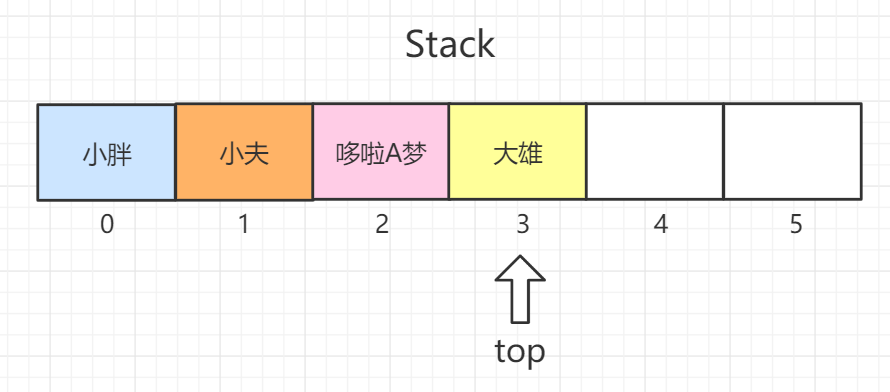
Stack是一种后入先出(LIFO)型的集合容器,如图中所示,大雄是最后一个进入容器的,top指针指向大雄,那么弹出元素时,大雄也是第一个被弹出去的。
Stack 继承了 Vector 类,提供了栈顶的压入元素操作(push)和弹出元素操作(pop),以及查看栈顶元素的方法(peek)等等,但由于继承了 Vector,正所谓跟错老大没福报,Stack 也渐渐被淘汰了。
取而代之的是后起之秀 Deque接口,其实现有 ArrayDeque,该数据结构更加完善、可靠性更好,依靠队列也可以实现LIFO的栈操作,所以优先选择 ArrayDeque 实现栈。
1 Deque<Integer> stack = new ArrayDeque <Integer>();
ArrayDeque 的数据结构是:数组,并提供头尾指针下标 对数组元素进行操作。本文也会讲到哦,客官请继续往下看,莫着急!:smile:
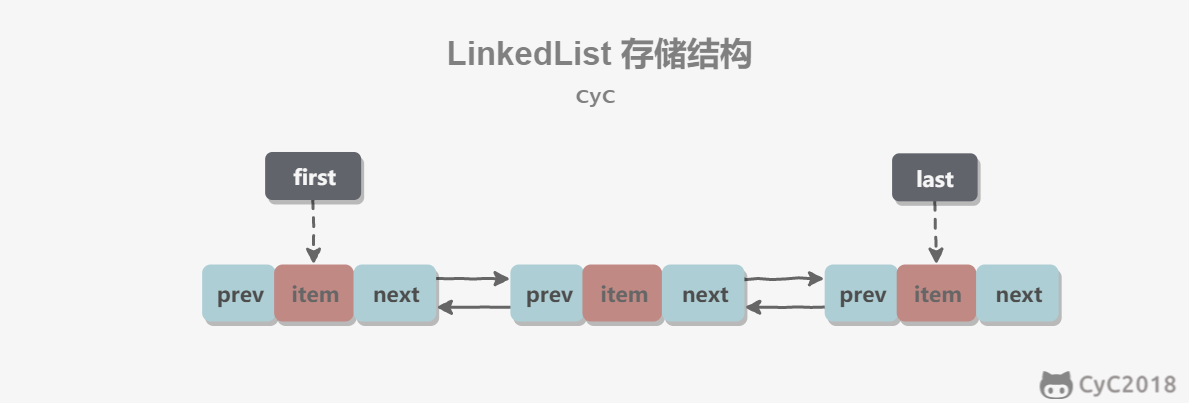
4 LinkedList :warning: 已弃用 1. 概览 基于双向链表实现,使用 Node 存储链表节点信息。
1
2
3
4
5
private static class Node <E> { E item; Node<E> next; Node<E> prev; }
每个链表存储了 first 和 last 指针:
1
2
transient Node<E> first;transient Node<E> last;
2. 与 ArrayList 的比较 ArrayList 基于动态数组实现,LinkedList 基于双向链表实现。ArrayList 和 LinkedList 的区别可以归结为数组和链表的区别:
数组支持随机访问,但插入删除的代价很高,需要移动大量元素;移动元素已经有内核级的优化。
链表不支持随机访问,但插入删除只需要改变指针。需要提前进行大量O(n)的查找,性能并没有优势。
在大多数场景下,已经没有使用价值。
元素索引的操作,ArrayList的随机访问更高。
元素收尾插入删除的操作,ArrayDeque循环数组具有更快的优势。
对于队列内部插入删除操作,虽然只有O(1),不需要移动元素,但是需要事先查找元素O(n),导致在实际使用中性能极其低下。